wm-primitives · the house system
Sixlaws.Everysurface.
Type, corners, circles, space, and color, each decided once and written down here — so a Glyphs plugin, a React proofing page, and wordmark.nyc round the same corners, spend the same space, and mean the same thing by a color. This is the long form: every law in one scroll, with the outline on the left. Each parameter earns its own page as the system grows.
The promise0
The package
One dial, one switch, one set of tokens, built once and proven in every app before it counts as shipped.
A dial in font-proofer, in ReCal, in opsz-proofer and in Kernpare is the same file, and a change to it reaches all four only after every one of them has been built, driven with a finger, and screenshotted against a baseline. If something here is inconsistent, that is a bug with a test missing, not a style choice.
This page is in the order you meet things. Everything it links to is the source; if this page and a linked file disagree, the file is right.
1What you get
COMPONENTS.md — every export, one line each, which apps draw it, and where its spec lives. Generated from index.ts, never hand-kept.
The ones people come for:
AxisSlider— the dial. One number on one axis; rail, field, stepper; four variants. Spec DIAL.md, promises GESTURES.md.ThemeSwitch— Auto / Light / Dark, one engine, two looks.IconandChevron— the one mark, the one chevron.dist/dial.js— the dial for a page with no React, same source, as a script tag.- Tokens, in four sheets that style nothing until you use them:
color.css,type.css(TYPOGRAPHY.md),space.css,motion.css. - The grid —
grid.css+gridSnap.js: 24 columns, a 3px line, one margin. A standard, with a lint and a CI check: GRID.md.
2What you must supply
HOST-CONTRACT.md — the tokens the consuming app defines, what each is, and what breaks without it. Two have no safe fallback: without --border the rail is invisible; without a theme stamped as data-theme a dark page is black on black. Both were found by wiring a bare app and are the first two steps of the HOWTO.
3How to wire it in, and add a dial
HOWTO.md. Part A: a submodule at shared/, the peer deps, the three token sheets, the contract, data-theme, one dial rendered — ten steps, each one a trap that was hit once. Part B: a new dial design is a variant, and how the receiving app takes it.
4How to override
Every rule this package writes is inside @layer wm.*. An unlayered rule in your app beats any of them, at any specificity, first try. Theme through tokens (the house signal is --signal / --signal-ink, defaulted in color.css; define --accent to override it), choose behavior through props, and reach in with a selector only as a last resort — where the layer guarantees you win. The header of src/AxisSlider.css is the long form.
5How you know it shipped
Push to main. consumers.yml checks out every consumer, puts your commit in its shared/, runs its lint and build, drives the gestures in Chromium and WebKit, screenshots every row, and only then tells the apps to deploy. Each app's deploy then waits until wordmark.nyc serves the bundle it built. Green means live, not pushed. EVAL.md is the methodology; tests/README.md the suites.
Tags. A change to what a consumer can see — a prop, a token name in HOST-CONTRACT.md, wmDial's API, a CSS class a host is told to use — gets a tag: v0.<minor>.<patch>, minor for a contract change, patch for anything else that ships, and the CHANGELOG entry names it. The deploys build against main today (git submodule update --remote), which is why "what is live" needed its own check; a consumer that wants to stand still pins the tag instead. v0.1.0 is the contract as of 2026-09-19.
The rest
- CHANGELOG.md — what changed and what it cost. Most entries are a fix for a fix; the wrong version is the useful part.
- SLIDERS.md — the census. Fifty-nine sliders, none a copy.
- BUTTONS.md — six button families to decide from, what each demonstrates and cannot do, and what none of them has had yet. None chosen.
- NEXT.md — the checklist from here to a system a stranger is fluent in.
- The system, illustrated — type, corners, circles, space, color as live CSS. A showing, not a consumer.
Consumed as a git submodule, not an npm package; each app's Vite/tsc compiles the TSX directly. Typed TSX; token-based CSS with fallbacks; font identity only — props carry family and axes, never proofing size.
Seven roles1
Type
Seven sizes with their leadings, every one on the 3px line, and a sixth signal, geom, that only the face can give.
The budget
Some changes the type requires to stay itself at a new setting. They carry no meaning and cost nothing. Others are made in order to say something, and those are the ones we ration. There are six.
- opsztracks the size, whatever it is.
- trackingcaps only, one value. Size is opsz’s job.
- leadinganswers to size and measure.
- sizethis is a different order of thing.
- casethis is a different kind of thing.
- inkthis is subordinate to what surrounds it.
- weightthis is the one to read first.
- rulea hairline under the words. The quietest of them.
- geoma different construction of the same letters. Cal Sans only.
One signal per distinction. Compensations ride along free.
Never ink + size + case together. Three ways of saying “minor” is not emphasis — it is a lack of confidence.
Heavier and a different hue. Two ways of saying “this is the heading” — and the pair is the habit hardest to notice, because each half looks reasonable alone.
Same size, same weight, same color, same case. Only a rule beneath it. The cheapest distinction available, and the one most proof sheets already reach for.
A geometric sans with an optical size axis, drawn for interfaces at small to medium sizes.
The sixth signal: geom
Same size, weight, color, and case — the letters are simply built differently. Four landings, at 0 · 25 · 50 · 100. Each sits in the middle of a pad the font holds flat, so the landing is a plateau rather than a point — which is what makes it a decision you can return to instead of a number you happened to drag to.
The pads are the font’s, not ours: A11y holds to 10, UI runs 16–34, Base 40–60, Geo from 80 up. Inside a pad the drawing barely moves, so precision buys nothing. Between pads it moves fastest, which is why a value like 37 is the worst of both — it belongs to no landing and reads as drift.
Maximum differentiation, so the characters that collide in
a code string stop colliding: capital I, lowercase l, digit one; zero against O.
The landing for anything a reader has to transcribe rather than read — which
is why every code pill in this section is set in the Face, instead
of importing a monospace to say the same thing much louder.
The default, and the one that survives being read for a
long time at a small size. It carries running copy and every piece of chrome, which
is why it is the value pinned into --ui-fvs.
Rounder construction for headings, sitting above UI copy without touching size, weight, or color. Seven letters redraw on the way here: the a at 34, then g u and the flattened extenders of f t j y at 40. Everything else on the line is the same letter it was.
The capitals and figures live here and nowhere else: C c M 1 5 0 hold one drawing all the way to 80, then change once. Which is why this is the landing for a capitalized eyebrow, a wordmark, or a number, and why at paragraph length it stops being a voice and starts being a costume.
Four landings on one page, and not one of them announces itself. The eyebrow is Geo, the heading is Base, this paragraph is UI, and the string below is A11y.
Geom rides along with a distinction you were making anyway. It is never the thing doing the work alone.
The whole axis, drawn
Every glyph Cal Sans swaps across GEOM, and the range each swap holds for. Read down a column and you are reading one landing’s alphabet; 37 is the gap between two of them. A figure drawn to scale: its lettering belongs to the chart, not to a role.
The seven roles leading 12 · 15 · 15 · 24 · 27 · 30 · 51
Each role at its real size and leading. Every role spends size and nothing else
— except label, which spends case instead and stays at chrome size
in full ink. Every leading is a whole number of 3px lines, so baselines of different
sizes still meet on one set of lines. Sizes are declared in rem against a
16px root, so the scale follows the reader’s own text size; we quote px because
that is how type is talked about.
micro · 9 / 12 · 4 units
glyph captions · size
latin small letter a with ring above
label · 12 / 15 · 5 units
run-in words, tags, controls · case
Geometric form
ui · 12 / 15 · 5 units
all chrome · the norm
Weight 400 · Optical size auto · Reset to defaults
body · 16 / 24 · 8 units
prose, docs · the norm
The optical size axis governs how the font behaves as size changes — stroke contrast, spacing, detail. A token that carries only a pixel value throws that away.
lede · 18 / 27 · 9 units
intros · size
Tokens govern the Face. The Specimen belongs to the user.
title · 26 / 30 · 10 units
panel and page titles · size
Optical size is part of the token
display · 45 / 51 · 17 units
largest chrome · size
Face & Specimen
The poster scale
The seven roles stop at 45px — the largest size chrome has any business being. Above it is a different instrument: the monster sample. And up there the naming rule inverts. At text sizes you name the job, because size alone doesn’t tell a reader what a thing is. At display sizes the job is magnitude — 96px isn’t a different kind of thing from 136px, it is the same thing, larger. So here a ladder is honest, where in the text scale it would have been a dodge.
Ratio √2 — the paper ratio, the one the A-series is built on, so every second step doubles exactly: 48 → 96 → 192. Tailwind’s 5xl–9xl walks 1.25, 1.20, 1.33, 1.33 — four intervals pretending to be a scale.
Leading tightens as the steps climb — a compensation. Tracking does not, and that is the rule: hand-tracking display type is what you do when a font has no optical size axis. Ours has one, so the fit tightens by itself.
A hero headline on wordmark.nyc.
The monster sample. The scale offers a step; size, leading, and axes stay the user’s to drive. It sets setting, never the typeface — which is how one ladder serves both sides of the boundary without breaking it.
Ink
Gray is a signal, so there are three of it, not a gradient. Each is expressed as opacity on the text color, so they compose over any ground and stay honest in both themes.
An arbitrary alpha is not an ink. All three rows above are one size, because quiet comes from ink at the size the context calls for — never from a smaller role and a lighter gray.
The acid yellow on dark, and its olive on light, are doing one job: pointing at the thing under discussion — the value being explained, the word the sentence is about. It never marks hierarchy and it never means “important.” The moment a color means important, it can no longer mean anything else, and every future use of it has to fight the one before.
Why opsz is free
Both lines are set at the title size in the same font. Only the optical size differs. This is what the type does to stay itself across sizes — a compensation, not a statement. Which is precisely why it must ride inside the token and never count against the budget.
The one exception: opsz
pinned while the size changes is a deliberate mismatch. That is no longer a
compensation. It is a signal, and it is spent.
The boundary
The one rule that keeps a type tool honest: the system dresses the interface, never the artifact under test.
Chrome. One vocabulary across wordmark.nyc, ReCal and font-proofer.
The proofed font. Its size, leading, and axes are the user’s parameter space — tokenizing them would systematize the subject of the tool. Set here at the title size only to sit beside the Face.
The grid 24 columns, a 3px line
Twenty-four columns, a 3px line and one margin for every page — a standard the way InDesign has one, not a convention. Text beside text shares a first baseline, a two-line label meets its sample by its last line, a component moves whole. Everything on this page outside a stage is on the line, and on the columns too: the rail spans five of the 24, one stays empty, and the copy starts on the seventh and runs to the margin (below 1024 the rail is a bar and the copy takes all 12). A stage — a demo with type of its own, like the sheets below — keeps its own room, and is never half on the line. GRID.md is the standard in words; the bench is where it was cut.
Columns 24, and 12 below 1024
24It halves, thirds, quarters, sixths, and eighths, and the Cal Sans case study splits its sections 5:7 three times, which is 10 and 14 in whole columns. 12 below 1024, because the phone's count has to divide the desktop's: a half is still a half and a third still a third when the columns fold. The gutter is the pad scale's 24, 12 on a phone; the margin is the case study's, and it is everyone's. A card is a box on the columns, and its contents step in one column and one gutter.
1440, drawn to scale · 24 columns, the cards take 10 and 14
900, drawn to scale · 12 columns, the cards take 5 and 7
390, drawn to scale · the cards stack, and the inset stays one column and one gutter
Baseline 3px, the leading subdivided
The line is a unit every leading divides into, not a leading itself — the way 12/15 sits on a 3pt grid. Body is 16/24, eight units. Each block's first line is nudged down onto the next line, and every line after it is a whole number of units behind, so a long paragraph stays on the grid its first line was put on.
Body copy is where the grid is decided. At 24 every line of a long paragraph lands on a line. At 24.8 the first line still does — the page puts it there — and each line after it falls another 0.8px behind, until by the fourth it sits a full unit off and the paragraph beside it no longer shares a single line with this one. Only first lines are moved, and on purpose: a leading that is not whole units is a fault in the stylesheet.
Big type beside small
Set every lead in whole 3px lines, so a lead of 24, 27, or 48 is eight, nine, or sixteen of them and a block's later lines stay on the grid its first line was put on.
In a row of side-by-side text, take the smallest lead as the row's step, and size the big text so its lead is a whole multiple of it — a size one token larger, never a loosened lead. Each headline line then lands on every other caption line.
Keep one step of white around big type, put rules and marks on the step, and when a row's leads cannot divide, change the size, not the grid. The full list is in GRID.md.
A row meets side by side, one baseline
Items that start in one row have their first line moved to the lowest first baseline among them. An item can meet the row by its last line instead, so a two-line caption ends on the big word's baseline rather than hanging below it. Only the block being aligned moves; the rest of each card keeps its own snap, so text set at the bottom of a card stays on its line. A shift larger than the text it moves is refused: that is a row that matched the wrong text.
24
columns from 1024px
3px
the line
12 below 1024,
to divide 24.
A component moves whole words stay with their control
Snap a label alone and it leaves the thing it labels. The pair below sits under a block that is off the unit on purpose, so both rows start between lines and something has to move. On the left it moves only the words, and the words slide off the pink line through the thumb. On the right the row is a component, and it travels as one: words, track, and thumb stay level. Step the block above from 48 to 52px and watch which side walks.
label snapped alone
—
component moves whole
—
Breakers and tools a page has a margin, a tool has none
A page keeps its margin; a tool has none, ever. wordmark.nyc and its Cal Sans case study are pages. font-proofer and ReCal are tools: their columns run edge to edge and the gutter stays, and a box that touches the window holds its text one gutter in from it, never flush. A breaker is the page's way out of its margin: a box that reaches the window's edge while its words stay at the margin. A picture breaker is all box.
A macOS window screenshot carries its drop shadow as a transparent margin, so the window sits inside the image and lands short of the columns. Flagged as a macOS shot, the shadow is cut out of the layout, and a file scaled after capture says by how much. Below, the window's edges sit on the lines of columns 11 and 24.
A breaker: the ground meets the window, the words stay on the margin.the padding it took back is the margin
The window, not the image, on the columns.columns 11 to 24
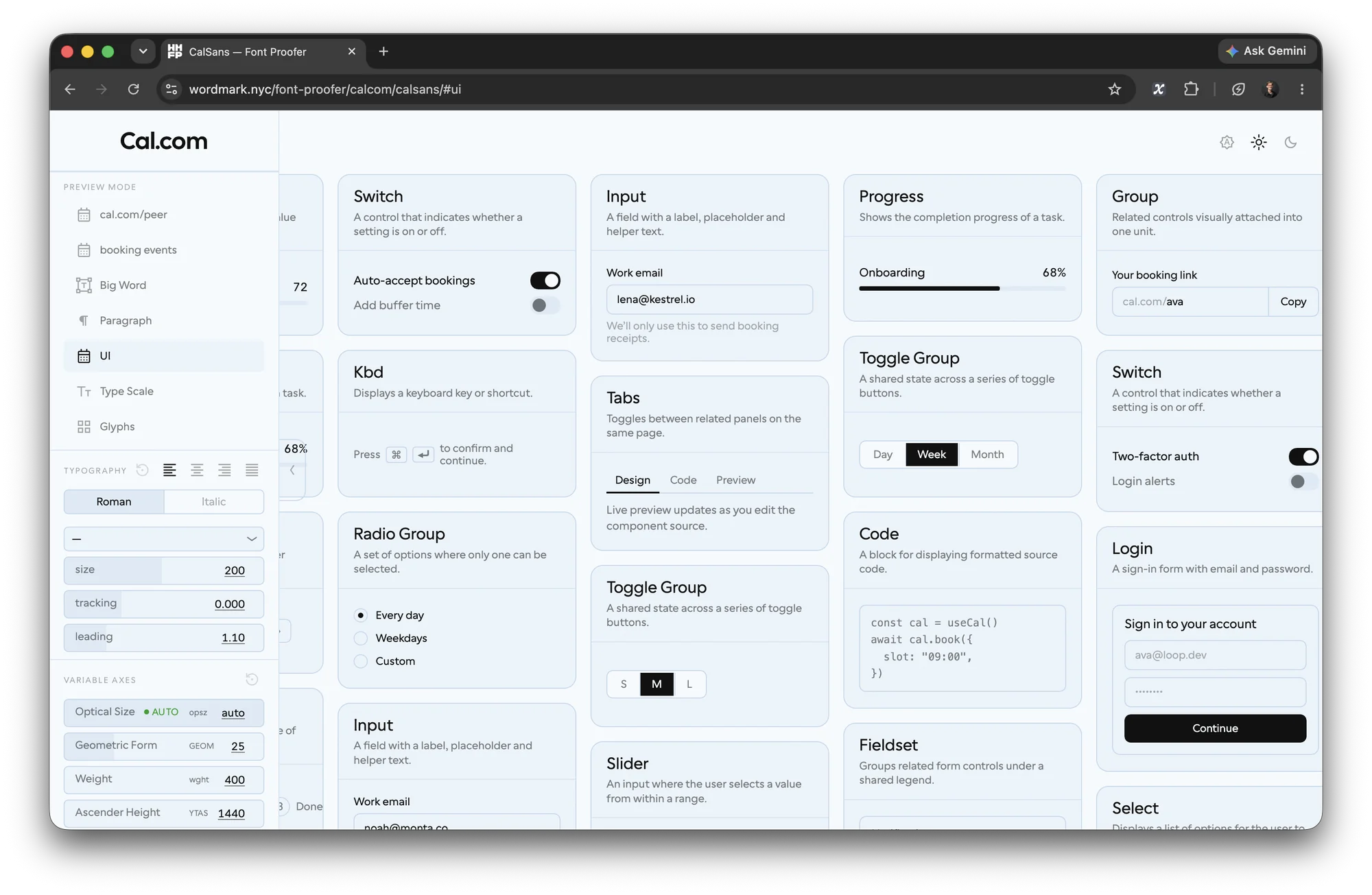
A page, drawn to scale · a breaker strip, a text breaker, and a window screenshot whose edges meet columns 11 and 24
Press for the columns, for the baseline — anywhere on the page.
G lays the house columns over the page in pink — 24 from 1024, 12 below — from the same three tokens as these stripes, so they land on them.
L draws a hairline every 3px down the page. The words beside this lead at twice this column’s lead, so each of their lines lands on every other one of these. Press again to hide.
No margin, ever — but never flush.
A tool, on this page's own columns, numbered as the page numbers them · columns to the window's edges, and text one gutter in where a box touches an edge
The favicons WM Mono, light and dark
The drawn WM over two letters. Every app’s icon is the drawn WM above its own two letters, set in WM Mono at one scale and each letter widened to its cell — mostly the square set 1.
The capitals
- A
- B
- C
- D
- E
- F
- G
- H
- I
- J
- K
- L
- M
- N
- O
- P
- Q
- R
- S
- T
- U
- V
- W
- X
- Y
- Z
Stylistic sets, marked by the rule above a letter: set 6 (ss06) for K M N R V W X, whose M and W are the drawn WM; set 1 (ss01) for A B C D G J O P Q S U; the rest default.
The lockups
Light and dark are the two fixed colorways, each shown on the ground it is for. A page links one file, which turns itself white under a dark scheme.

 lightdarkfont-prooferF default, P set 1
 lightdarkGliffDiffG set 1, D set 1
 lightdarkopsz-prooferO set 1, P set 1
 lightdarkwm-primitivesP set 1, R set 6
 lightdarkWORDMAKEW default, M set 5
 lightdarkReCalC set 1, S set 1
One curve2
The corner law
Every corner rounds the way Cal Sans is drawn, superellipse at 1.2 on a ladder of radii, and the true circles are counted so nothing else can pass for one.
A rounded rectangle meets its straight edge at a curvature break: the cap is
bending at 1/r, the side at zero, and the eye reads the seam even when it cannot name it.
superellipse(1.2) eases curvature to zero before the join instead
— G2 continuity, which is how Cal Sans itself is drawn. The UI rounds the way the
letterforms do.
The parameter is not the exponent. CSS folds
superellipse(1) to round and superellipse(2) to
squircle, so the real exponent is 2k — k 1.2 is
≈ 2.30, just past a circle. Scope below is ReCal only, the COSS kit excluded:
of 168 corners, 87 take the law, 13 are circles carved out, and 32 sit in the frozen
App.css. Live surface: 42.
The 5 pills 999px in situ — k comes from the toggle
The radius ladder every swatch 2:1 — the proportion these radii sit on
Asymmetric corners the law applies per corner; square ones stay square
Corners — ReCal only
The COSS demo kit is out: it was 81 of the original 168. What remains is
87 corners — 13 circles excluded, 74 taking the law, and of those 32 are in the frozen
App.css. The live surface is 42.
The 13 circles excluded — every one a true circle on a square box
The 5 pills your 2:1 rule — min-width = 2 × height
The button the primary and the secondary, chosen 2026-10-08
Two of the six graduated on 2026-10-08: the primary and the
secondary, in src/button-sets.css. They are not a pair — each has its
own place, and one panel never holds both. Beside .wm-btn rather than on top of
it, so nothing that ships today moves.
The primary .wm-menu .wm-menu--row .wm-menu-list
An enclosure means chosen, not pressable. It is what font-proofer’s rail already does, and what that is, is a menu — preview modes of equal weight, picked between rather than read, which is the one place where a mark earns its space. A row has no edge at rest — a mark, a label, and the full width of the column as its target — and the ground arrives when it is the one that is on.
Already shipping · font-proofer, Preview Mode
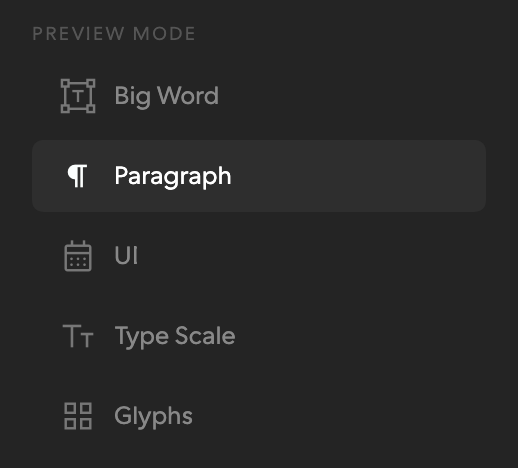
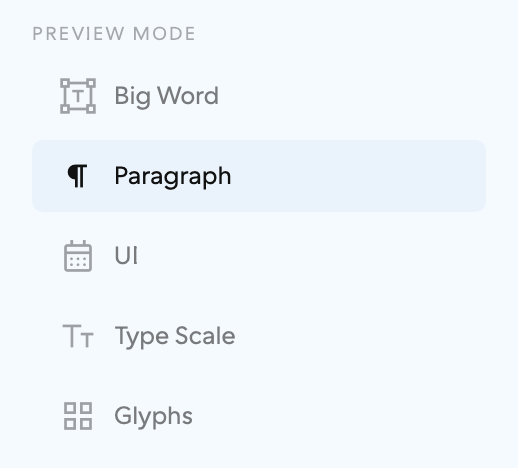
This is the primary as font-proofer already draws it
(.mode-group of .mode-btn, .mode-btn-row where a
panel toggle trails). Adopting the primitive there is a rename, not a redraw.
Menu
States
Buttons
The primary is the giveaway: it spends its enclosure on chosen, so the one action that matters can only borrow the same ground. There is no louder left to go.
Editable
In situ
Screamer
And here is the family’s ceiling: chosen IS the loudest thing it owns.
What it costsA resting row states nothing on its own — and the family survives that only on two conditions it cannot enforce for itself: every row carries a mark, and every row is the full width of its column. Strip either and this becomes the unformatted list. It also needs somewhere to be a menu: the row shape wants 200px and a left edge to sit against. And because the enclosure is spent on chosen, there is nothing left to spend on primary — a destructive action here looks like every other row.
And it does not do prose. The editable mark is drawn on the text,
so on a value it is four characters wide and on a wrapped sentence it is two full lines of
underline. .slider-number was written for a number in a rail and it is right
there.
every figure in this chapter, one theme
The secondary .wm-rule
The type is the control. No box in any state. An action is
ink-full with a solid rule at 1px, thickening to the same two numbers the press
law uses — 1.2 under the pointer, 1.8 held. An editable is the identical rule,
dashed. Solid means it happens; dashed means it is yours. The condition is absolute:
nothing else in the document may be underlined.
Buttons
No icon-only formThere is nothing to draw it in. Those actions borrow the boxed button.
States
Editable
In situ
Menu
And this is where the family runs out. The rule scopes to the text, so in a row the leading mark, the label, and the trailing mark are three objects at the same height with nothing holding them together — an underline cannot reach across a flex gap, and the row never becomes one thing. Which is why a list of rows is the primary’s, never this.
Screamer
No box at any size. The rule thickens with the type instead of staying 1px.
What it costsThree things. The 44px floor is bought entirely with invisible padding, so two stacked actions are 88px of line box or they overlap. Two actions side by side read as one sentence unless something separates them. And the whole family depends on a document-wide prohibition that no component can enforce — the first underlined caption someone adds takes the affordance down with it.
Why these two, in the study’s own words.
06 for the menu, where an enclosure means chosen and the row does the pointing … Which one, Six ways to say press
The type is the control. No box in any state. … the condition is absolute: nothing else in the document may be underlined. 03 Rule, Six ways to say press
Why they never share a panel. The study paired the menu with the boxed button and named the rule the one to reject, and its worry about the pairing was one panel holding two meanings of a box at once. That objection is now the rule: a panel is a menu or it is a run of text, and it uses one set. An enclosure only ever means chosen, and a rule only ever means press, because nothing else is underlined.
All six, with every state and every cost: the primary is formerly 06 and the secondary formerly 03 in Six ways to say press.
One dial3
Interface
Five ways to draw the same dial, the icons that travel with it, and the chips, toggles, and zoom that share its grammar.
Five ways to draw one dial
The first four carry the same three controls — one with a unit, one with
a tag, one with neither — so the labeling question stays visible while the shapes are
compared, and they share one state. What every field here has in common is what
AxisSlider ships: a single type=text field, so the value can print a
real minus where a number input is stuck with a hyphen; drawn chevrons rather than the browser's
stepper; and a clamp on the field as well as the track. 05 is the odd one — three
numbers of one parameter rather than one number of three. Nothing here changes value on
scroll.
Icons
Two families, and the split is not taste. Material Symbols for anything
that is a symbol: it is a variable font, so an icon answers the pointer by pressing
harder rather than by swapping drawings, and it themes on GRAD without moving
its own metrics. The house chevron for every chevron, because Material’s
opsz axis bottoms out at 20 and a dial’s stepper is six pixels tall —
a glyph drawn for 20px used at 6 is the 20px drawing scaled down, stroke and all. A stroked
path has no floor.
Used
Drawn by at least one app. The shipped face is a 96-name subset in
fonts/, cut by scripts/cut-icon-subset.py, and lint-icons.py fails an app on a
name outside it. Both lists are read from the font’s ligature table and the apps’ own sources by
scripts/gen-index.mjs, never kept by hand; hover an icon to see which apps draw it. (WORDMAKE still ships the
whole family for itself.) The stepper’s arrows are not here: a stepper is the house chevron, not a Material icon.
Ready
In the face, drawn by no app yet, so one can be reached for without a font rebuild. Each moves up to Used the day an app draws it.
Missing
An app names it and the face cannot draw it: in an app that loads the subset it prints as stray glyphs. Add it to the subset, or use another name.
Chevrons
One drawing, one angle (34.6°), three sizes. The stroke is derived from the width rather than fixed — optical sizing by another name: at one absolute stroke a small chevron carries more ink per unit of mark and reads heavier.
The chips
One of a set, every option visible, the chosen one filled — so the state
reads at rest and nothing waits to be discovered under the pointer. ReCal’s zone chips
gave the grammar (an outline in the option’s own hue, a fill for the chosen one),
font-proofer’s preset bar the size. A chip chooses; .wm-btn does. Click any
of these. src/chip.css.
A set. One is chosen, and data-label reserves each chip’s width, so choosing never shifts the row.
Each in its own hue, from --chip-color.
Small, over a canvas, with a switch beside it: --small and --switch.
The zoom control
The page’s own zoom, as a control that sits under the theme switch:
zoom_out, the rail of the value-in-the-handle dial with the percentage riding in the
lozenge, zoom_in, and the mark, which is the default view: press it and the page is back at 100. It applies CSS zoom to a
target anchored top-left, so the target grows right and down and scrolls, nothing reflows, and
type stays type. 50–400%, steps of 10, kept in localStorage. Drag the lozenge,
press the marks, or focus the rail and press + − 0.
src/zoomControl.js + .css; GESTURES.md §12.
The morph. One glass leaves the box as it fills and zips to the lozenge’s place; it splits into − and +, which pull the rule out to the ends; the lozenge appears as a dot and grows round 1, 10, 100, 100%. Closing folds it back. Composed from the control’s own keyframes by scripts/zoom-morph-svg.mjs: open 600ms, hold, close 300ms, hold.

At rest, one mark, with data-collapse. Press it and the control opens leftwards out of it while the mark stays put and fills. Press the mark again, Escape, or anywhere else, and it folds and keeps the zoom: shut at a zoom, the value stays on show beside the filled mark. The reset is a press on the lozenge, or 0. The mark is data-icon.
Left. .wm-zoom--left in a .wm-theme-row opens leftwards over its own row, from a 27px footprint. The marks, the action, and the line below never move.
Hamburgefonstiv
Zoomed by the control in the title row, which captures the browser’s zoom over this card (data-capture): pinch on a trackpad, or ⌘/Ctrl + − 0, with the pointer here. Elsewhere on the page the browser zooms as ever.
Stack. .wm-theme-stack rests as one mark at the right edge under the theme chips, and opens under them: one width and one right edge from one grid column. The rail’s 10rem floor makes it the wider row.
Hamburgefonstiv
A sample card, zoomed by the control above. At 200% every length in it is twice as long and every baseline twice as far down; past the card’s edge it scrolls.
The markup, mounted at DOMContentLoaded or by wmZoom.mount(el). Without data-collapse it is always open, the mark is only the reset, and it needs no stack.
<span class="wm-theme-row">
  <span class="wm-zoom wm-zoom--left" data-collapse data-target="#page"></span>
  <span class="wm-theme">…the three marks…</span>
</span>
<div class="wm-theme-stack">
  <div class="wm-chip-row" role="group" aria-label="Color scheme">…Auto Light Dark…</div>
  <div class="wm-zoom" data-collapse data-icon="pageview" data-target="#page"></div>
</div>
data-min / max / step | 50 / 400 / 10 |
|---|---|
data-collapse | rest as one mark |
data-open="true" | start open |
data-capture | take over pinch and ⌘/Ctrl + − 0 over the target, or a selector |
data-key | the localStorage key, wm-zoom: "170 open" |
data-icon | pageview | feature_search |
data-keys="local" | keys only with focus inside |
events | wm-zoom, detail the percent · wm-zoom-open, detail true / false · both bubble |
keys | + or = in · − or - out · 0 back to 100 · arrows / Home / End on the rail · Escape folds, keeps the zoom · never with Cmd / Ctrl / Alt |
the mark | shut: opens · open: folds, keeps the zoom · without data-collapse: back to 100 |
the pill | press: back to 100, it counts down and slides home · drag: drags |
The theme stack, vertical
The phone’s version of the cluster: Auto, Light, Dark, and the zoom’s mark,
top to bottom, fixed to the top right of the screen so it never pans with the page, floating
over the text with no bar and no ground. The chosen mark is the house active mark — the PQ
swatch on a dark ground (HDR white; plain white on an SDR screen), full ink on light. Opt-in
dismissal, data-hide: scroll hides it on the way down and shows it on the way up
(24px before a direction counts); swipe dismisses it on an upward swipe that starts on it,
and a tap at the top edge or a scroll up brings it back; both are on by default. A host that covers the corner sets data-hidden (or calls wmThemeStack.hide(el, true)) and the stack stays away until it is removed. With top chrome, data-below names the last row and the stack rests under it, never on it. The zoom opens down from its mark, and a pinch on the text (data-capture, touch too) opens it and drives it instead of zooming the page. .wm-theme-stack--vertical
(themeSwitch.css), src/themeStack.js; GESTURES.md §13.
Hamburgefonstiv
The stack floats over this text with no bar behind it. Scroll down and it slides off the top; scroll up and it is back. Swipe up on it and it goes; a tap at the top edge returns it.
Second paragraph, so the box scrolls. Sphinx of black quartz, judge my vow; pack my box with five dozen liquor jugs.
Third paragraph. How vexingly quick daft zebras jump; the five boxing wizards jump quickly.
Fourth. Jackdaws love my big sphinx of quartz. Waltz, bad nymph, for quick jigs vex.
Fifth. Glib jocks quiz nymph to vex dwarf. Bright vixens jump; dozy fowl quack.
Sixth, the foot of the box. Quick zephyrs blow, vexing daft Jim. Two driven jocks help fax my big quiz.
.wm-zoom--down, the stack’s only layout: the rail runs down from the mark, max at the top; the lozenge does not rotate. data-capture: pinch the text (trackpad or fingers) and it opensThe markup · the class is the HOST’s to put on, under its own phone rule; CSS cannot add a class, so it is the app’s mobile branch or a matchMedia
<div class="wm-theme-stack wm-theme-stack--vertical" data-hide="scroll swipe" data-below="header .row">
  <div class="wm-theme" role="group" aria-label="Color scheme">…the three marks…</div>
  <div class="wm-zoom wm-zoom--down" data-collapse data-capture data-target="#page"></div>
</div>

const phone = matchMedia('(max-width: 768px), (pointer: coarse)')
const orient = () => stack.classList.toggle('wm-theme-stack--vertical', phone.matches)
orient(); phone.addEventListener('change', orient)

data-hide       scroll | swipe | "scroll swipe"   (none: it stays)
data-scroller   only this scroller counts (default: any vertical scroll on the page)
data-below      the host's top chrome (a selector, commas allowed): rests 6px under the LOWEST match,
                on the line, re-measured as rows come and go; nothing matching, the default 6px
--stack-top     the same by hand (a multiple of 3), for a host with no selector to give.
                Here: 90px, under the frame's two 42px rows -- a frame's rows are not the viewport's
--zoom-rail     the down rail at most (126px); it shortens itself so the box ends 12px inside the viewport
                or the data-scroller box, 45px at least
data-fit        (on the zoom or the stack) a lower box to end inside instead -- a row below the stage
                that is free under the zoom column; the lowest match wins, nothing matching falls back
data-hidden     the HOST's: hidden whatever the scroll says, until removed (a sheet over the corner)
                wmThemeStack.hide(el, true | false) toggles just that; the script's own state is data-stowed
wmThemeStack.mount(el)   for a stack rendered after load; returns .hide() .show() .hidden(), the scroll state
events          wm-theme-stack (detail: { hidden }), bubbling
marks           27px squares, 33 on touch · the zoom's mark --spacing-02 under the third
place           fixed, --spacing-02 from the top, --spacing-04 from the right, past the safe areas
the target      pans sideways in its own overflow-x: auto box, or a phone widens the viewport and the stack moves
A press that worked blinks: off for 0–80, on for 80–160, then it settles.


:active acknowledges a press. When it worked, the control confirms
it, like a macOS menu item: its own press look off, then on, then the result. One keyframe
set, one call, wmConfirm(el). GESTURES.md §14.
Every control here acknowledges first, so the off phase has something to undo: the menu row and the rule take the press stroke, the chip's edge goes to full ink over a wash, the mark steps up to its hover rung. Hold a press to see it.
· slowed ×8 until then
Accent buttons AccentButton
Two acid buttons, each a pill (the Download button) or a chip (a Try-bar toggle that is on). The light is a pre-rendered, dithered image behind a near-black face, never a CSS gradient or blur, so it keeps its long falloff without banding. Q5 is underlit: a rim along the bottom edge, a spill beneath it, and a light that deepens slowly on hover while the face never brightens. Q6 to N4 rests as a pinprick of rim light and, on hover, moves the light from beneath to behind: it travels along the bottom edge, round the lower corners and up the sides, and the top edge lights all at once.
Checking which path this browser takes…
This browser has no JPEG XL, so nothing is shown here: the AVIF fallback bakes its ground into the light, and on any other ground it shows as a box.
This browser has no JPEG XL, so nothing is shown here: the AVIF fallback bakes its ground into the light, and on any other ground it shows as a box.
Disabled is unlit and neutral, a dark face with a faint hairline and a grey label, never a dimmed acid. A
pressed button sits one pixel down. The pill is a full render at its own size, 225 × 32 for Q5 and
227 × 33 for Q6 to N4, so its box is fixed and the host places it. The chip is 32 tall with an 8px radius, and its
light is a 9-slice of two end pieces and a stretched middle, so one set serves any width. Dark ground only: the face
is --surface.
Q5 has an HDR light. On an HDR display, in the dark theme, its spill, its rim, and its label go past SDR white: each lit layer is a PQ image whose value is the light itself, floor plus glow, peaking at 589 nits, and the label is acid at that same peak, painted through the glyphs. On an SDR screen it is exactly the button above. The images bake the #1a1a1a ground they sit on. In the light theme Q5 is ink on paper: an ink face, an apple light below it, and an apple label. On an HDR display the light theme's Q5 is lit in acid instead, a broad light that peaks at 405 nits on the white ground, with an acid label at 605.
Q6 to N4 has the same HDR light, dark and light: the spill, the traveling rim, the streak, and the label, whose resting ink thins to show acid as the light comes on. Where the browser decodes JPEG XL, both looks' light is transparent, so it sits on any ground, as the five grounds show. The traveling light steps one frame at a time instead of cross-fading. Both looks show their HDR only on an HDR display.
To contain the light, give its box overflow: clip. Never a mask, overflow: hidden on a
scroller, opacity, or transform on an ancestor. The pill in a rail above is ReCal's Download, at the foot of its rail.
<AccentButton look="q5" shape="pill">Download</AccentButton>, or
look="q6n4" shape="chip". The images are in assets/accent/, and
tools/accent/ renders them.
| Look | Shape | Box | Light |
|---|---|---|---|
| q5 | pill | 225 × 32 | one 329 × 108 render, scaled on hover |
| q5 | chip | any × 32 | 9-slice, 96px reference |
| q6n4 | pill | 227 × 33 | 48-frame sprite, cross-faded additively |
| q6n4 | chip | any × 32 | end pieces and a stretched rim column |
WIP primitives pages to decide from
Nothing here shipsA control above has a spec and a test; a page here has a choice still to make. Each entry is a proposal page assembled nowhere else, drawn in hairline so it cannot pass for finished.
- undecidedSeven ways to say playthe one control where a press does two things, drawn seven ways by what carries the difference: the mark, the ring, the word, the ground, the enclosure, the elevation, the surface. All live on one fake ninety-second clip. Superseded in scope by the transport page below — the bar, not the button, is the instrument — and kept as the record of the button question. TRANSPORT.md.
- undecidedSix ways to build the barone transport primitive — play, scrubber, readouts slot — in two registers, WORDMAKE's frames and Morf's builds, each schema drawn twice on the same live clocks: Deck, Slate, Ruler, Strip, Cells, Overlay. Decided: one primitive; no stage click; Morf's stops evenly by beat. Undecided: the schema. TRANSPORT.md has the coverage and what none has had.
A pad scale4
Space
Twelve steps of padding read off the live surface, a cap at the radius, and a rule for when a row may spend a step.
The padding scale
Derived from the live surface, not invented: 117 padding numbers across 21 distinct values. This scale snaps 78 exactly, moves 39, and moves nothing more than 25%. Structure is the poster scale's — every second step doubles.
The steps 4 → 8 → 16 → 32 → 64, with 6 · 12 · 24 · 48 between
The cap rule padding-x ≥ 0.6 × radius
A rounded end is shorter near the edge, so a letter placed there has less material above and below it than the padding number implies. Blue is the height that actually exists where the text starts. At corner-k 1.2 the shape reaches 95% of its height by 27px — 0.6r, marked by the ticks. The remaining 5% costs the other 17px, which is why the floor is not the full radius.
| pill | height | radius | padding-x | |
|---|---|---|---|---|
| zone-chip | 28px | 14px | 12px | short 2px |
| ssd-chip | 20px | 10px | 6px | short 4px |
| state-tag | 20px | 10px | 12px | clears |
| preview-reset | 24px | 12px | 12px | clears |
Use a step or change the design, not the number
The scale is a vocabulary, not a target to migrate toward. A value that is close to a step is the expensive kind of wrong: it reads as the scale to everyone who comes after, so it gets copied, and the copy is what drifts.
- Sit on a step. 4 · 6 · 8 · 12 · 16 · 24 · 32 · 48 · 64. Every second one doubles, so the scale stays legible when it is read as a series rather than a list.
- Let steps compose. Nested padding adds up: a 4 inside a container plus an 8 on the row is the 12 the trigger already uses. Alignment falls out for free.
- Spend the hairlines optically. 1, 2 and 3 are for a ring, a nudge, a bar — alignment, not spacing. They are outside the doubling on purpose.
- Clear 0.6 × the radius on anything with a round cap, so the letters keep their full height where the shape is shortest.
- Don’t use a near-miss. 5, 7, 9, 10, 14, 20, 28, 40, and 54 all look like the scale at a glance and are not on it. Each is within 20% of a real step, which is exactly why nobody catches it.
- Don’t tune a number to fix alignment. If two things do not line up, the sum of the nesting is wrong — a step is not.
- Don’t pad a pill to satisfy the cap rule. Both live pills already clear it. The rule is a floor to check against, not a size to design to.
- Don’t invent a step for one component. If nothing on the scale fits, the component is the thing to change.
The primitives and the instrument chrome already sit on the scale. Two places deliberately do not, and neither is an oversight: App.css is frozen, and the UI-kit board is a gallery of COSS components rather than house UI — nothing in it aligns against our chrome, so it keeps its own numbers.
The audit5
Color
Six hundred and ninety-two declarations, a hundred and eighty values, and the three ramps every one of them has to come from.
Color audit
Every color literal in the three style bases — 692 of them, 180 distinct values — with what each one does and where to find it.
#e8e8e828#11182728#fff26#1a1a1a20#e5e7eb20#11118#55518#38383817#44416#37415116#f3f4f616#66615#2a2a2a15#1e1e1e14The signal
The signal marks a state or a control, never “important”. In light it is two tokens, --signal for fills (handles, dots, chosen pills) and --signal-ink for anything thin or typographic (text, rules, rings, hairlines); in dark both are the acid.
The vocabulary 68
Every token DEFINITION. These are the names everything else should be spending.
font-proofer / index.css 41
| value | what it does | property | selector | where |
|---|---|---|---|---|
#242424 | the page ground | --bg | :root | index.css |
#2e2e2e | raised panel fill | --bg-elevated | :root | index.css |
#383838 | hover active fill | --bg-hover | :root | index.css |
#3a3a3a | visible hairline color | --border | :root | index.css |
#2f2f2f | barely-there divider | --border-subtle | :root | index.css |
#ffffff | body text color | --text | :root | index.css |
#888888 | secondary text color | --text-muted | :root | index.css |
#555555 | tertiary text color | --text-dim | :root | index.css |
#ffffff | selection emphasis color | --accent | :root | index.css |
#ffffff | body text duplicate | --ink | :root | index.css |
rgba(255,255,255,0.42) | secondary text alpha | --muted | :root | index.css |
#2b2b2b | unfilled slider track | --track-empty | :root | index.css |
rgba(255,255,255,0.28) | editing affordance bar | --edit-rail | :root | index.css |
rgba(var(--text-rgb) | hover active fill | --surface-hi | :root | index.css |
rgb(... / a) | hover active fill | --surface-hi | :root | index.css |
#f5faff | the page ground | --bg | [data-theme="light"] | index.css |
#eaf3fb | raised panel fill | --bg-elevated | [data-theme="light"] | index.css |
#ddeaf6 | hover active fill | --bg-hover | [data-theme="light"] | index.css |
#c4d8eb | visible hairline color | --border | [data-theme="light"] | index.css |
#d4e5f3 | barely-there divider | --border-subtle | [data-theme="light"] | index.css |
#111111 | body text color | --text | [data-theme="light"] | index.css |
rgba(17,17,17,0.55) | secondary text color | --text-muted | [data-theme="light"] | index.css |
rgba(17,17,17,0.35) | tertiary text color | --text-dim | [data-theme="light"] | index.css |
#111111 | selection emphasis color | --accent | [data-theme="light"] | index.css |
#111111 | body text duplicate | --ink | [data-theme="light"] | index.css |
rgba(17,17,17,0.45) | secondary text alpha | --muted | [data-theme="light"] | index.css |
#d4e5f3 | unfilled slider track | --track-empty | [data-theme="light"] | index.css |
rgba(17,17,17,0.30) | editing affordance bar | --edit-rail | [data-theme="light"] | index.css |
#f5faff | the page ground | --bg | [data-theme="auto"] | index.css |
#eaf3fb | raised panel fill | --bg-elevated | [data-theme="auto"] | index.css |
#ddeaf6 | hover active fill | --bg-hover | [data-theme="auto"] | index.css |
#c4d8eb | visible hairline color | --border | [data-theme="auto"] | index.css |
#d4e5f3 | barely-there divider | --border-subtle | [data-theme="auto"] | index.css |
#111111 | body text color | --text | [data-theme="auto"] | index.css |
rgba(17,17,17,0.55) | secondary text color | --text-muted | [data-theme="auto"] | index.css |
rgba(17,17,17,0.35) | tertiary text color | --text-dim | [data-theme="auto"] | index.css |
#111111 | selection emphasis color | --accent | [data-theme="auto"] | index.css |
#111111 | body text duplicate | --ink | [data-theme="auto"] | index.css |
rgba(17,17,17,0.45) | secondary text alpha | --muted | [data-theme="auto"] | index.css |
#d4e5f3 | unfilled slider track | --track-empty | [data-theme="auto"] | index.css |
rgba(17,17,17,0.30) | editing affordance bar | --edit-rail | [data-theme="auto"] | index.css |
ReCal / tokens.css 24
| value | what it does | property | selector | where |
|---|---|---|---|---|
#000 | proofing stage black | --stage-deep | :root | tokens.css |
#0f0f0f | the page ground | --bg | :root | tokens.css |
#111 | the page ground | --bg | :root | tokens.css |
#1a1a1a | raised panel fill | --surface | :root | tokens.css |
#252525 | hover active fill | --surface-hi | :root | tokens.css |
#e8e8e8 | body text color | --text | :root | tokens.css |
#999 | secondary text color | --text-muted | :root | tokens.css |
#666 | tertiary text color | --text-dim | :root | tokens.css |
#444 | faintest text color | --text-faint | :root | tokens.css |
rgba(var(--text-rgb) | faintest text color | --text-faint | :root | tokens.css |
rgb(... / a) | faintest text color | --text-faint | :root | tokens.css |
#333 | visible hairline color | --border | :root | tokens.css |
#222 | barely-there divider | --border-subtle | :root | tokens.css |
rgba(255, 255, 255, 0.28) | editing affordance bar | --edit-rail | :root | tokens.css |
#e8e8e8 | selection emphasis color | --accent | :root | tokens.css |
#999 | preview value marker | --marker-preview | :root | tokens.css |
#c97050 | stock crop warning | --state-stock | :root | tokens.css |
#d9a441 | frozen axis gold | --freeze-gold | :root | tokens.css |
rgba(217, 164, 65, .16) | frozen wash tint | --freeze-gold-dim | :root | tokens.css |
#c97050 | GEOM a11y zone | --zone-a11y | :root | tokens.css |
#999 | GEOM ui zone | --zone-ui | :root | tokens.css |
#fff | ui zone ongrid | --zone-ui-on-grid | :root | tokens.css |
#4a7fd4 | GEOM base zone | --zone-base | :root | tokens.css |
#4aad5c | GEOM geo zone | --zone-geo | :root | tokens.css |
ReCal / holo.css 2
| value | what it does | property | selector | where |
|---|---|---|---|---|
#545454 | app-specific token | --holo-metal-dark | :root | holo.css |
#b5b5b5 | app-specific token | --holo-metal-light | :root | holo.css |
ReCal / shell.css 1
| value | what it does | property | selector | where |
|---|---|---|---|---|
rgba(201, 112, 80, .6) | app-specific token | --info-color | .info-panel | shell.css |
Literal colors outside App.css 81
A color written directly instead of through a token. This is the actionable cleanup list.
ReCal / holo.css 34
| value | what it does | property | selector | where |
|---|---|---|---|---|
rgba(255,30,168,0) | surface fill | background-image | .rail-seam--down .rail-seam-lbl | holo.css |
#ff1ea8 | surface fill | background-image | .rail-seam--down .rail-seam-lbl | holo.css |
#ffe600 | surface fill | background-image | .rail-seam--down .rail-seam-lbl | holo.css |
#21ff6a | surface fill | background-image | .rail-seam--down .rail-seam-lbl | holo.css |
#1a3cff | surface fill | background-image | .rail-seam--down .rail-seam-lbl | holo.css |
#ffffff | surface fill | background-image | .rail-seam--down .rail-seam-lbl | holo.css |
rgba(255,30,168,.85) | surface fill | background-image | .rail-seam--down .rail-seam-lbl | holo.css |
rgba(255,230,0,.85) | surface fill | background-image | .rail-seam--down .rail-seam-lbl | holo.css |
rgba(26,60,255,.85) | surface fill | background-image | .rail-seam--down .rail-seam-lbl | holo.css |
rgba(26,60,255,0) | surface fill | background-image | .rail-seam--down .rail-seam-lbl | holo.css |
#ff2e6e | surface fill | background-image | .mc-word | holo.css |
#ffb02e | surface fill | background-image | .mc-word | holo.css |
#ffe600 | surface fill | background-image | .mc-word | holo.css |
#ff2ec4 | surface fill | background-image | .mc-word | holo.css |
#b05cff | surface fill | background-image | .mc-word | holo.css |
#5c7aff | surface fill | background-image | .mc-word | holo.css |
#7a8aff | surface fill | background-image | .mc-word | holo.css |
#ff2e6e | surface fill | background-image | .mc-word | holo.css |
#ff2e6e | surface fill | background-image | .holo-loading | holo.css |
#ffb02e | surface fill | background-image | .holo-loading | holo.css |
#ffe600 | surface fill | background-image | .holo-loading | holo.css |
#ff2ec4 | surface fill | background-image | .holo-loading | holo.css |
#b05cff | surface fill | background-image | .holo-loading | holo.css |
#5c7aff | surface fill | background-image | .holo-loading | holo.css |
#7a8aff | surface fill | background-image | .holo-loading | holo.css |
#ff2e6e | surface fill | background-image | .holo-loading | holo.css |
#2a2a2a | surface fill | background-image | .holo-loading | holo.css |
#2a2a2a | surface fill | background-image | .holo-loading | holo.css |
#ff2e6e | surface fill | background-image | .holo-once | holo.css |
#ffb02e | surface fill | background-image | .holo-once | holo.css |
#ffe600 | surface fill | background-image | .holo-once | holo.css |
#ff2ec4 | surface fill | background-image | .holo-once | holo.css |
#b05cff | surface fill | background-image | .holo-once | holo.css |
#5c7aff | surface fill | background-image | .holo-once | holo.css |
ReCal / shell.css 18
| value | what it does | property | selector | where |
|---|---|---|---|---|
rgba(201, 112, 80, .85) | other | font-weight | .info-h | shell.css |
rgba(201, 112, 80, .5) | text color | color | .info-k | shell.css |
rgba(201, 112, 80, .4) | text color | color | .info-arrow | shell.css |
rgba(201, 112, 80, .35) | hairline / border | border-bottom | .info-nameinput | shell.css |
rgba(0, 0, 0, .45) | ring or shadow | box-shadow | .dock-download | shell.css |
rgba(0, 0, 0, .4) | ring or shadow | box-shadow | .type-panel | shell.css |
rgba(0, 0, 0, .5) | ring or shadow | box-shadow | .style-menu-list | shell.css |
rgba(0, 0, 0, .35) | text color | color | .style-menu-item:hover .style-badge | shell.css |
#b9c4d6 | other | bottom | .rail-seam--down | shell.css |
rgba(232,232,232,.3) | other | top | .rail-seam--up | shell.css |
rgba(232,232,232,.6) | text color | color | .rail-seam--up:hover:not(:disabled) | shell.css |
rgba(255,255,255,.2) | other | position | .matrix-axis-tick | shell.css |
#000 | mask stop | -webkit-mask-image | .matrix-geom-shade | shell.css |
#000 | mask stop | -webkit-mask-image | .matrix-geom-shade | shell.css |
#000 | mask stop | mask-image | .matrix-geom-shade | shell.css |
#000 | mask stop | mask-image | .matrix-geom-shade | shell.css |
#fff | surface fill | background | .matrix-handle:hover | shell.css |
rgba(0,0,0,.4) | surface fill | background | .matrix-val | shell.css |
primitives / UiKitBoard.css 10
| value | what it does | property | selector | where |
|---|---|---|---|---|
#46c07a | text color | color | .dot-ok | UiKitBoard.css |
#e0a23a | text color | color | .dot-ok | UiKitBoard.css |
#e0603a | text color | color | .dot-ok | UiKitBoard.css |
#e0603a | other | display | .ui-alert-ic | UiKitBoard.css |
#46c07a | other | font-size | .ui-delta | UiKitBoard.css |
rgba(0, 0, 0, .35) | ring or shadow | box-shadow | .ui-toast | UiKitBoard.css |
rgba(255, 255, 255, .07) | surface fill | background | .ui-sk::after | UiKitBoard.css |
rgba(0, 0, 0, .45) | surface fill | background | .coss-loading | UiKitBoard.css |
rgba(0, 0, 0, .55) | surface fill | background | .ui-menu | UiKitBoard.css |
#e0603a | text color | color | .ui-menu-del | UiKitBoard.css |
ReCal / coss.css 10
| value | what it does | property | selector | where |
|---|---|---|---|---|
#46c07a | text color | color | .dot-ok | coss.css |
#e0a23a | text color | color | .dot-ok | coss.css |
#e0603a | text color | color | .dot-ok | coss.css |
#e0603a | other | display | .ui-alert-ic | coss.css |
#46c07a | other | font-size | .ui-delta | coss.css |
rgba(0, 0, 0, .35) | ring or shadow | box-shadow | .ui-toast | coss.css |
rgba(255, 255, 255, .07) | surface fill | background | .ui-sk::after | coss.css |
rgba(0, 0, 0, .45) | surface fill | background | .coss-loading | coss.css |
rgba(0, 0, 0, .55) | surface fill | background | .ui-menu | coss.css |
#e0603a | text color | color | .ui-menu-del | coss.css |
primitives / type.css 5
| value | what it does | property | selector | where |
|---|---|---|---|---|
rgba(var(--text-rgb) | other | ours | (root) | type.css |
rgb(… / α) | other | ours | (root) | type.css |
rgba(var(--text-rgb) | text color | color | .ink-full | type.css |
rgba(var(--text-rgb) | text color | color | .ink-quiet | type.css |
rgba(var(--text-rgb) | text color | color | .ink-faint | type.css |
primitives / GlyphPicker.css 1
| value | what it does | property | selector | where |
|---|---|---|---|---|
#111 | other | dark-first | .gp-name | GlyphPicker.css |
primitives / InlineEmphasisBubble.css 1
| value | what it does | property | selector | where |
|---|---|---|---|---|
rgba(0, 0, 0, 0.35) | ring or shadow | box-shadow | .inline-emph-menu | InlineEmphasisBubble.css |
primitives / StyleScopeDropdown.css 1
| value | what it does | property | selector | where |
|---|---|---|---|---|
rgba(0, 0, 0, 0.35) | ring or shadow | box-shadow | .ssd-list | StyleScopeDropdown.css |
ReCal / tokens.css 1
| value | what it does | property | selector | where |
|---|---|---|---|---|
#0f0f0f | other | surface | :root | tokens.css |
The GEOM zones 3 palettes
Not in the CSS audit above, because these live in an .svg. The same four
landings carry three different sets of values that have never been reconciled: ReCal's muted
in-app zones, the saturated marketing hues in the GEOM map, and the lightness-lifted dark-mode set
derived from them. Hue angle is close across all three; saturation and lightness are not.
| landing | ReCal --zone-* | GEOM map · light | GEOM map · dark |
|---|---|---|---|
| A11y | #c9705016° 53% 55% | #ff6b3516° 100% 60% | #ff855716° 100% 67% |
| UI | #9999990° 0% 60% | neutral — no hue | neutral — no hue |
| Base | #4a7fd4217° 62% 56% | #00a0ff202° 100% 50% | #4db5ff205° 100% 65% |
| Geo | #4aad5c131° 40% 48% | #00c700120° 100% 39% | #33e033120° 74% 54% |
Derived shades on top of these: the zone washes at
.07 opacity in light and .11 in dark (a flat tint at 7% reads on paper but
vanishes when inverted onto a dark ground). Plus ReCal's --state-stock #c97050, which is the A11y orange reused for crop
warnings, and --freeze-gold
#d9a441 with its .16 wash.
Only three of the four landings carry a hue. UI is deliberately neutral —
#999 in ReCal, the plain ink in the map — because it is the default and a default should
not announce itself.
Ramps
One curve, two channels. A scrim's alpha and a blend's color are one cubic Bézier applied to two quantities: one sampler, two emitters, no second engine. The blur that used to be the third is one radius, and the page says why. Every gradient here is a string src/gradient.ts emitted; nothing is typed in, so nothing can go stale on its own.
The curve cubic-bezier(0.416, 0.657, 0.695, 1)
Two CodePens make this fade by hand: seven stops, each typed in. A cubic-bezier() fitted to those seven lands within 0.0012 of every one, RMS 0.00071 — a third of one step in 8-bit. The fit is measured, not asserted, and it means the clothoid is a preset here, not a code path: the hand-written fade and the curve are the same fade. The white dots are the eight default stops. They crowd toward the transparent end because the curve is sampled by its own parameter, not at even positions — which is where the pens' own stops crowd too.
| at | the pens | the curve | Δ |
|---|---|---|---|
| 0.00% | 1.0000 | 1.0000 | +0.0000 |
| 50.00% | 0.3000 | 0.2988 | −0.0012 |
| 65.00% | 0.1500 | 0.1509 | +0.0009 |
| 75.50% | 0.0750 | 0.0747 | −0.0003 |
| 82.85% | 0.0370 | 0.0367 | −0.0003 |
| 88.00% | 0.0190 | 0.0179 | −0.0011 |
| 100.00% | 0.0000 | 0.0000 | +0.0000 |
The edge where a fade announces itself
A straight alpha ramp does not read as straight. Perceived lightness moves fastest at the transparent end, so a linear fade announces itself where it starts and then crawls; on live text that is a visible line across the second row of type, and it is the failure this curve was fitted to remove. The unveiled panel is the control: both scrims fade the same color over the same text across the same distance, and only the curve differs.
Hamburgefonstiv — the tail of the work goes on
past the point where the reader can still be
sure of it, which is the whole affordance: a
hard cut reads as the end of the specimen
rather than the end of what has loaded so far.
The fade is not decoration. It is the signal
that there is more, and it has to arrive without
announcing itself, or it becomes a panel laid
over the text instead of the ink thinning out.
A flat swatch forgives any curve. Type will not.
Hamburgefonstiv — the tail of the work goes on
past the point where the reader can still be
sure of it, which is the whole affordance: a
hard cut reads as the end of the specimen
rather than the end of what has loaded so far.
The fade is not decoration. It is the signal
Hamburgefonstiv — the tail of the work goes on
past the point where the reader can still be
sure of it, which is the whole affordance: a
hard cut reads as the end of the specimen
rather than the end of what has loaded so far.
The fade is not decoration. It is the signal
that there is more, and it has to arrive without
announcing itself, or it becomes a panel laid
over the text instead of the ink thinning out.
A flat swatch forgives any curve. Type will not.
Hamburgefonstiv — the tail of the work goes on
past the point where the reader can still be
sure of it, which is the whole affordance: a
hard cut reads as the end of the specimen
rather than the end of what has loaded so far.
The fade is not decoration. It is the signal
Hamburgefonstiv — the tail of the work goes on
past the point where the reader can still be
sure of it, which is the whole affordance: a
hard cut reads as the end of the specimen
rather than the end of what has loaded so far.
The fade is not decoration. It is the signal
that there is more, and it has to arrive without
announcing itself, or it becomes a panel laid
over the text instead of the ink thinning out.
A flat swatch forgives any curve. Type will not.
Hamburgefonstiv — the tail of the work goes on
past the point where the reader can still be
sure of it, which is the whole affordance: a
hard cut reads as the end of the specimen
rather than the end of what has loaded so far.
The fade is not decoration. It is the signal
Where you mix the midpoint, four spaces
The received wisdom is that oklab rescues a gradient from the gray sRGB puts at its midpoint. It does not. For the pair above, the midpoint's saturation is 11% in sRGB and 14% in oklab: a straight line between opposite hues crosses the neutral axis in any rectangular space, because that is where the axis is. What oklab buys is even lightness — the red→green midpoint sits at luma 111 against sRGB's 101, so the ramp no longer dips dark in the middle. Only oklch holds chroma, 63% at the same midpoint, by treating hue as an angle and going around the axis instead of through it; it pays with a hue nobody picked. The default stays oklab, the predictable one. The first draft of this page had the claim the wrong way round.
Steering a channel Mass Driver's schema
One curve on the interpolation re-spaces the stops along a fixed path through color space. A curve per channel moves the path. Left: the same two colors with one channel steered at a time — the ramp leaves the straight line between its endpoints, which is how a ramp escapes sRGB's gray without changing space. Right: the three channels of #F65030 → #3050F6, each on its own axis. R falls, B rises, and G does not move. That flat channel is why the pair never grays, and why steering G on it does nothing at all. channelBlend() reproduces Mass Driver's published output byte for byte; the equality is a test.
The blur one radius, not a ramp
One backdrop-filter, one radius, nothing masked. This chapter was a progressive blur until 2026-09-20 and every way of building one over live text failed the same way. Hard bands: no ghost, but the radius jumps at each boundary and the staircase shows. Feathered bands: no steps, but at partial mask alpha the compositor blends the blurred copy over the still-sharp original — when it was tried, one full-cover layer at half alpha measured a peak edge of 108 against 217 unblurred and 19 fully blurred, so half the sharp text survives in every feather zone and the words double. That construction is not on this page any more; the figures are kept with their method so the decision stays checkable. Content copies: the same defect, measured worse. A stepless blur that varies down the page needs the text rasterized to a canvas, which costs the live text, and live text is the point. So: a uniform blur, whose row-to-row sharpness change across the panel below is 0.002, and a slider on its radius. The first draft of this chapter blamed the mask for smearing the whole panel; the mask was never broken. The page's corner-shape: superellipse drops a mask on any layer whose host has a non-round corner, and only the host, which is why resetting the layers changed nothing. Found by lifting the panel up its ancestors until masking worked.
Hamburgefonstiv — the tail of the work goes on
past the point where the reader can still be
sure of it, which is the whole affordance: a
hard cut reads as the end of the specimen
rather than the end of what has loaded so far.
The fade is not decoration. It is the signal
that there is more, and it has to arrive without
announcing itself, or it becomes a panel laid
over the text instead of the ink thinning out.
A flat swatch forgives any curve. Type will not.
Hamburgefonstiv — the tail of the work goes on
past the point where the reader can still be
sure of it, which is the whole affordance: a
hard cut reads as the end of the specimen
rather than the end of what has loaded so far.
The fade is not decoration. It is the signal
that there is more, and it has to arrive without
announcing itself, or it becomes a panel laid
over the text instead of the ink thinning out.
A flat swatch forgives any curve. Type will not.
It blurs pixels. It does not redact. The words stay in the DOM — selectable, copyable, findable, and read aloud in full by a screen reader, which sees no blur. Never use it to withhold anything.
Banding 8-bit, and what no curve can fix
Eight bits give 256 levels of alpha, and one step between neighbors is about the same faint edge wherever it sits — 0.365 ΔL* at the dark end of the rows below, 0.351 at the light end — and one edge that size is under what an eye resolves. Banding is not the edge. It is the repetition: steps close enough to read as a pattern, far enough apart not to fuse. Visibility peaks; it is not a slope. The control crosses 217 levels at 5px each and fuses into a smooth ramp. The dark fade crosses 76 at 14px each and bands unmistakably. Push the same steps out to 155px apart, as the previous draft of this chapter did, and the field goes flat and the edges vanish with it. More stops cannot help: an 8-stop ramp and a 2-stop ramp quantize to the same levels and band identically, and nothing in CSS asks for more output bits. Tone matters on its own: the third row has the same 76 levels at the same 14px and a per-step ΔL* within a twentieth of the dark row's, and it is clean. CIELAB is uniform for small patches, not for a one-level edge run across a wide smooth field, which is why every banding complaint is about the dark end.
Mostly you do not need it. Skia dithers a background-image gradient and very nearly does not dither a mask-image: the same ramp measures a per-pixel deviation of 2.98 as a background against 0.22 as a mask. So a scrim is dithered for you, a mask over a flat ground is not, and that mask is the one place in this package that bands. .wm-dither goes after the quantizer, on the wrapper: inside the masked element the noise modulated the ink before the mask touched it and measurably did nothing. After the quantizer is also its limit. It composites over the steps rather than preventing them, so it breaks the widest identical run from 35px to 23px and hides the edge, but the one-level step survives in the column mean, 1.29 against the mask's 0.99, and turning it up adds noise faster than it removes step. The background row is the one that halves the step itself, to 0.49, because Skia dithers before it quantizes. The first draft of this chapter said dither removes the staircase; the second said wide terraces are what make it visible. Both were wrong, and both were measured wrong before they were written wrong. Nothing here makes a 76-level fade at this density disappear. The fix that works is a ramp that fuses or a scrim Skia dithers, not a mask across a wide dark field. Judge this chapter on a real display at 100%: a downscaled screenshot averages the steps away.
background-image · Skia dithers before it quantizes · the step itself halves, to 0.49.wm-dither on the wrapper · widest run 35px → 23px, the step survives at 1.29 · hidden, not removedThree durations6
Motion
Three durations and one curve, so a change reads as the same gesture wherever it happens, and the confirm that proves a press landed.
The durations motion.css
Every transition reads a token; a duration spelled out in a rule is a lint failure. The values are ReCal’s, written down in its spec, not the fallbacks that had accumulated beside them.
| Token | Value | For |
|---|---|---|
--dur-fast | 140ms | a state change on one element: hover, press, focus, a color |
--dur-med | 240ms | something resizing or revealing: a collapse, a panel |
--dur-layout | 300ms | a large surface moving: the sidebar, the mobile sheet |
--dur-slow | 400ms | something crossing the screen |
--dur-hint | 3s | not motion: how long a one-time hint stays |
--dur-confirm | 80ms | one phase of the confirm; a blink, so off the ladder |
Three stepsThree steps carry nearly everything. A mark’s rollover runs at --icon-dur, 90ms, under
--dur-fast on purpose: at 140 the mark lagged the row it sits in, and a rollover should feel like
the pointer, not an animation about it. A state change is fast, 140. A reveal is medium, 240.
The curve --ease
One curve, cubic-bezier(0.2, 0.7, 0.2, 1), the Cal Sans case study tester’s unlock curve:
quick off the mark, long settle. It was typed out three times with a comment calling it the house easing;
it is a token now, --ease in motion.css, and the three read it.
| Reader | Duration | What moves |
|---|---|---|
| zoomControl.js, the morph | 600 / 300ms | the zoom control opening out of its mark, and closing |
| zoomControl.js, the reset | --dur-med | the lozenge sliding home to 100 |
| themeSwitch.css, the stow | 180ms | the vertical theme stack leaving the top edge |
Acknowledge and confirm GESTURES §14
A press is answered twice. :active acknowledges it while the pointer is down. When the press
worked, the control’s script adds .wm-confirm: its press look goes off for 80ms, on for 80ms,
then the control settles into its result. A blink, steps(1), paint only: no box moves.
| t | --confirm-off | What shows |
|---|---|---|
| 0–80ms | 1 | the press look off: the control’s rest paint |
| 80–160ms | 0 | the press look on |
| 160ms | — | the class comes off; the control is in its result state |
The morph GESTURES §12
The zoom control opens leftwards out of its mark in one 600ms timeline, 2.5 × --dur-med,
and closes in 300, the open folded back. Layout jumps to the end state at once; only the drawing travels.
No reflowThe morph animates three properties and nothing else, so no frame reflows the page: a magnifier leaves the mark as it fills, zips to where the lozenge will sit, and the rule opens from it by its clip. The theme stack’s stow is a translate, the confirm a custom property that only paint reads.
Reduced motion prefers-reduced-motion: reduce
Every file that moves carries its own rule, and each says the same thing: the end state, at once.
| Where | With reduced motion |
|---|---|
| motion.css, confirm.js | no class, no blink: straight to the result (G85) |
| zoomControl.js | the two states swapped with no morph (G68); the reset jumps (G72) |
| themeSwitch.css | the stack stows and returns without the translate |
| collapse.css | the box opens and shuts without its height transition |
| icon, chip, button, chevron, slider CSS | their transitions off |
Appendix
Which app draws which control, read from the source, so a change knows every place it lands before it ships.
#444
4 jobs 15 uses
| drawn as a hairline | border | .zone-col-radio-row input[type="radio"] | base | ReCal/App.css |
| cast as a ring/shadow | box-shadow | .gp-cell:hover | base · fallback | primitives/GlyphPicker.css |
| painted as a surface | background | .gg-handle | base | ReCal/App.css |
| painted as text | color | .presets-more | base | ReCal/App.css |
| painted as text | color | .attribution | base | ReCal/App.css |
| painted as text | color | .loading-note | base | ReCal/App.css |
| painted as text | color | .zone-preview-label | base | ReCal/App.css |
| painted as text | color | .zone-range-label | base | ReCal/App.css |
| painted as text | color | .axis-bounds | base | ReCal/App.css |
| painted as text | color | .preview-size-label | base | ReCal/App.css |
| painted as text | color | .gg-geom-axis-label | base | ReCal/App.css |
| painted as text | color | .calcom-nav-btn:hover | base | font-proofer/App.css |
| painted as text | border-color | .auto-ascender-preview-btn:hover:not(:disabled) | base | ReCal/App.css |
| painted as text | border-color | .preview-modal-header .modal-close:hover:not(:disabled) | base | ReCal/App.css |
| painted as text | border-color | .pill-reset-btn:hover | base | ReCal/App.css |
#0f0f0f
4 jobs 9 uses
| other role | | :root | base | ReCal/tokens.css |
| cast as a ring/shadow | box-shadow | .slider-row--diamond input[type="range"]::-webkit-slider-thu | base · fallback | primitives/AxisSlider.css |
| cast as a ring/shadow | box-shadow | .slider-row--diamond input[type="range"]::-moz-range-thumb | base · fallback | primitives/AxisSlider.css |
| painted as a surface | background | body | base | ReCal/App.css |
| painted as a surface | background | .gg-sticky-header | base | ReCal/App.css |
| painted as a surface | background | .coss-shell | base | font-proofer/App.css |
| painted as text | color | .zone-col-preview-word | base | ReCal/App.css |
| painted as text | color | .mult-btn.active | base | ReCal/App.css |
| painted as text | color | .classic-ui button | base | ReCal/App.css |
#e8e8e8
3 jobs 26 uses
| cast as a ring/shadow | box-shadow | .gp-cell--active | base · fallback | primitives/GlyphPicker.css |
| painted as a surface | background | .mult-btn.active | base | ReCal/App.css |
| painted as a surface | background | .classic-ui button | base | ReCal/App.css |
| painted as a surface | background | .vslider-thumb | base | ReCal/App.css |
| painted as a surface | background | .zone-col-radio-row input[type="radio"]:checked::after | base | ReCal/App.css |
| painted as text | color | body | base | ReCal/App.css |
| painted as text | color | .controls-toggle | base | ReCal/App.css |
| painted as text | border-top-color | .spinner | base | ReCal/App.css |
| painted as text | color | .zone-col-geom-default | base | ReCal/App.css |
| painted as text | color | .zone-col-word | base | ReCal/App.css |
| painted as text | color | .zone-type-tester | base | ReCal/App.css |
| painted as text | color | .site-footer-links a:hover | base | ReCal/App.css |
| painted as text | color | .site-footer-credit a:hover | base | ReCal/App.css |
| painted as text | accent-color | input[type='range'] | base | ReCal/App.css |
| painted as text | color | .zone-preview-line | base | ReCal/App.css |
| painted as text | color | .preview-samples p | base | ReCal/App.css |
| painted as text | border-color | .mult-btn.active | base | ReCal/App.css |
| painted as text | color | .gg-preview-word | base | ReCal/App.css |
| painted as text | color | .gg-geom-tooltip | base | ReCal/App.css |
| painted as text | color | .waterfall-text | base | ReCal/App.css |
| painted as text | color | .preview-modal-panel | base | ReCal/App.css |
| painted as text | accent-color | .pm-ctrl input[type='range'] | base | ReCal/App.css |
| painted as text | color | .pm-zone-tab.active | base · fallback | ReCal/App.css |
| painted as text | color | .preview-modal-text | base | ReCal/App.css |
| painted as text | color | .pill-reset-btn--active | base | ReCal/App.css |
| painted as text | border-color | .zone-col-radio-row input[type="radio"]:checked | base | ReCal/App.css |
#1a1a1a
3 jobs 19 uses
| drawn as a hairline | border-top | .waterfall-row | base | ReCal/App.css |
| drawn as a hairline | border-bottom | .palette-row | base | ReCal/App.css |
| drawn as a hairline | border-top | .preview-size-row--bottom | base | ReCal/App.css |
| drawn as a hairline | border | .ui-toast, .ui-dialog | base · fallback | primitives/UiKitBoard.css |
| drawn as a hairline | border | .ui-card2 | base · fallback | primitives/UiKitBoard.css |
| drawn as a hairline | border | .ui-panel | base · fallback | primitives/UiKitBoard.css |
| other role | font-size | .ui-field | base · fallback | primitives/UiKitBoard.css |
| painted as a surface | background | .controls-toggle | base | ReCal/App.css |
| painted as a surface | background | .preset-btn:not(:disabled):hover | base | ReCal/App.css |
| painted as a surface | background | .error pre | base | ReCal/App.css |
| painted as a surface | background | .axis-tag | base | ReCal/App.css |
| painted as a surface | background | .mult-btn | base | ReCal/App.css |
| painted as a surface | background | .modal-close:hover:not(:disabled) | base | ReCal/App.css |
| painted as a surface | background | .auto-ascender-preview-btn:hover:not(:disabled) | base | ReCal/App.css |
| painted as a surface | background | .preview-modal-header .modal-close:hover:not(:disabled) | base | ReCal/App.css |
| painted as a surface | background | .calcom-day:not(.empty):not(.past) | base | font-proofer/App.css |
| painted as a surface | background | .pm-zone-tabs | base | ReCal/App.css |
| painted as a surface | background | .inline-emph-menu | base · fallback | primitives/InlineEmphasisBubble.css |
| painted as a surface | background | .ui-code | base · fallback | primitives/UiKitBoard.css |
#111
3 jobs 18 uses
| other role | dark-first | (root) | base | primitives/GlyphPicker.css |
| other role | | :root | base | ReCal/tokens.css |
| painted as a surface | background | .preset-btn | base | ReCal/App.css |
| painted as a surface | background | .gg-geom-tooltip | base | ReCal/App.css |
| painted as a surface | background | .gg-geom-dot | base | ReCal/App.css |
| painted as a surface | background | .calcom-card | base | font-proofer/App.css |
| painted as a surface | background | .modal-panel | base | ReCal/App.css |
| painted as a surface | background | .calcom-day.selected.today::after | base | font-proofer/App.css |
| painted as a surface | background | .preview-modal-panel | base | ReCal/App.css |
| painted as a surface | background | .coss-sidebar | base | font-proofer/App.css |
| painted as a surface | background | .preset-add-btn | base | ReCal/App.css |
| painted as a surface | background | .coss-mobile-bar | base | font-proofer/App.css |
| painted as a surface | background | .coss-bottom-nav | base | font-proofer/App.css |
| painted as text | color | .calcom-day.selected | base | font-proofer/App.css |
| painted as text | color | .calcom-day.selected | base | font-proofer/App.css |
| painted as text | color | .coss-new-btn | base | font-proofer/App.css |
| painted as text | color | .pill-slider .dialkit-slider-label | base | ReCal/App.css |
| painted as text | color | .coss-bottom-btn--fab | base | font-proofer/App.css |
#383838
3 jobs 16 uses
| drawn as a hairline | border-bottom | .ui-table tr.total td | base · fallback | primitives/UiKitBoard.css |
| other role | width | .ui-track | base · fallback | primitives/UiKitBoard.css |
| other role | flex | .ui-bar | base · fallback | primitives/UiKitBoard.css |
| painted as a surface | background | .ui-item.on | base · fallback | primitives/UiKitBoard.css |
| painted as a surface | background | .ui-avatar | base · fallback | primitives/UiKitBoard.css |
| painted as a surface | background | .ui-switch--off | base · fallback | primitives/UiKitBoard.css |
| painted as a surface | background | .ui-nav-item.on | base · fallback | primitives/UiKitBoard.css |
| painted as a surface | background | .ui-sk | base · fallback | primitives/UiKitBoard.css |
| painted as a surface | background | .ui-btn--ghost:hover | base · fallback | primitives/UiKitBoard.css |
| painted as a surface | background | .ui-item:hover:not(.on) | base · fallback | primitives/UiKitBoard.css |
| painted as a surface | background | .ui-nav-item:hover:not(.on) | base · fallback | primitives/UiKitBoard.css |
| painted as a surface | background | .ui-seg > span:hover:not(.on) | base · fallback | primitives/UiKitBoard.css |
| painted as a surface | background | .ui-rec:hover | base · fallback | primitives/UiKitBoard.css |
| painted as a surface | background | .ui-cal-d:hover | base · fallback | primitives/UiKitBoard.css |
| painted as a surface | background | .ui-tool:hover, .ui-tool.on | base · fallback | primitives/UiKitBoard.css |
| painted as a surface | background | .ui-menu-item:hover | base · fallback | primitives/UiKitBoard.css |
#222
3 jobs 5 uses
| drawn as a hairline | border-top | .gp--bottom .gp-side | base · fallback | primitives/GlyphPicker.css |
| drawn as a hairline | border-left | .gp-sb | base · fallback | primitives/GlyphPicker.css |
| painted as a surface | background | .preset-btn--active | base | ReCal/App.css |
| painted as text | border-color | .preset-btn--see-all | base | ReCal/App.css |
| painted as text | border-color | .preset-btn--more | base | ReCal/App.css |
rgba(255,255,255,0.07)
3 jobs 5 uses
| drawn as a hairline | border | .coss-shell | base | font-proofer/App.css |
| drawn as a hairline | border | .coss-event-card | base | font-proofer/App.css |
| other role | height | .coss-ctx-divider | base | font-proofer/App.css |
| painted as a surface | background | .coss-ctx-item:hover | base | font-proofer/App.css |
| painted as a surface | background | .coss-badge--cal | base | font-proofer/App.css |
#111827
2 jobs 28 uses
| painted as a surface | background | [data-theme="light"] .coss-nav-item:hover | light | font-proofer/App.css |
| painted as a surface | background | [data-theme="light"] .coss-nav-item.active | light | font-proofer/App.css |
| painted as a surface | background | [data-theme="light"] .coss-new-btn | light | font-proofer/App.css |
| painted as a surface | background | [data-theme="light"] .coss-toggle.on | light | font-proofer/App.css |
| painted as a surface | background | [data-theme="light"] .coss-bookings-tab.active | light | font-proofer/App.css |
| painted as a surface | background | [data-theme="light"] .coss-bottom-btn--fab | light | font-proofer/App.css |
| painted as a surface | background | [data-theme="auto"] .coss-nav-item:hover | light | font-proofer/App.css |
| painted as a surface | background | [data-theme="auto"] .coss-nav-item.active | light | font-proofer/App.css |
| painted as a surface | background | [data-theme="auto"] .coss-new-btn | light | font-proofer/App.css |
| painted as a surface | background | [data-theme="auto"] .coss-toggle.on | light | font-proofer/App.css |
| painted as a surface | background | [data-theme="auto"] .coss-bookings-tab.active | light | font-proofer/App.css |
| painted as a surface | background | [data-theme="auto"] .coss-bottom-btn--fab | light | font-proofer/App.css |
| painted as text | color | [data-theme="light"] .coss-wordmark | light | font-proofer/App.css |
| painted as text | color | [data-theme="light"] .coss-sidebar-link:hover | light | font-proofer/App.css |
| painted as text | color | [data-theme="light"] .coss-page-title | light | font-proofer/App.css |
| painted as text | color | [data-theme="light"] .coss-card-title | light | font-proofer/App.css |
| painted as text | color | [data-theme="light"] .coss-booking-date-label | light | font-proofer/App.css |
| painted as text | color | [data-theme="light"] .coss-booking-title | light | font-proofer/App.css |
| painted as text | color | [data-theme="light"] .coss-empty-title | light | font-proofer/App.css |
| painted as text | color | [data-theme="light"] .coss-mobile-wordmark | light | font-proofer/App.css |
| painted as text | color | [data-theme="auto"] .coss-wordmark | light | font-proofer/App.css |
| painted as text | color | [data-theme="auto"] .coss-sidebar-link:hover | light | font-proofer/App.css |
| painted as text | color | [data-theme="auto"] .coss-page-title | light | font-proofer/App.css |
| painted as text | color | [data-theme="auto"] .coss-card-title | light | font-proofer/App.css |
| painted as text | color | [data-theme="auto"] .coss-booking-date-label | light | font-proofer/App.css |
| painted as text | color | [data-theme="auto"] .coss-booking-title | light | font-proofer/App.css |
| painted as text | color | [data-theme="auto"] .coss-empty-title | light | font-proofer/App.css |
| painted as text | color | [data-theme="auto"] .coss-mobile-wordmark | light | font-proofer/App.css |
#fff
2 jobs 25 uses
| painted as a surface | background | .coss-toggle-thumb | base | font-proofer/App.css |
| painted as a surface | background | [data-theme="light"] .coss-shell | light | font-proofer/App.css |
| painted as a surface | background | [data-theme="light"] .coss-sidebar | light | font-proofer/App.css |
| painted as a surface | background | [data-theme="light"] .coss-new-btn | light | font-proofer/App.css |
| painted as a surface | background | [data-theme="light"] .coss-event-card | light | font-proofer/App.css |
| painted as a surface | background | [data-theme="light"] .coss-ctx-menu | light | font-proofer/App.css |
| painted as a surface | background | [data-theme="light"] .coss-booking-row | light | font-proofer/App.css |
| painted as a surface | background | [data-theme="light"] .coss-mobile-bar | light | font-proofer/App.css |
| painted as a surface | background | [data-theme="light"] .coss-bottom-nav | light | font-proofer/App.css |
| painted as a surface | background | [data-theme="light"] .coss-bottom-btn--fab | light | font-proofer/App.css |
| painted as a surface | background | [data-theme="auto"] .coss-shell | light | font-proofer/App.css |
| painted as a surface | background | [data-theme="auto"] .coss-sidebar | light | font-proofer/App.css |
| painted as a surface | background | [data-theme="auto"] .coss-new-btn | light | font-proofer/App.css |
| painted as a surface | background | [data-theme="auto"] .coss-event-card | light | font-proofer/App.css |
| painted as a surface | background | [data-theme="auto"] .coss-ctx-menu | light | font-proofer/App.css |
| painted as a surface | background | [data-theme="auto"] .coss-booking-row | light | font-proofer/App.css |
| painted as a surface | background | [data-theme="auto"] .coss-mobile-bar | light | font-proofer/App.css |
| painted as a surface | background | [data-theme="auto"] .coss-bottom-nav | light | font-proofer/App.css |
| painted as a surface | background | [data-theme="auto"] .coss-bottom-btn--fab | light | font-proofer/App.css |
| painted as a surface | background | .matrix-handle:hover | base | ReCal/shell.css |
| painted as text | color | .preset-btn:not(:disabled):hover | base | ReCal/App.css |
| painted as text | color | .preset-btn--active | base | ReCal/App.css |
| painted as text | border-color | [data-theme="light"] .coss-search-bar | light | font-proofer/App.css |
| painted as text | border-color | .preset-variant-pill.active | base | ReCal/App.css |
| painted as text | border-color | [data-theme="auto"] .coss-search-bar | light | font-proofer/App.css |
#e5e7eb
2 jobs 20 uses
| painted as a surface | background | [data-theme="light"] .coss-shell | light | font-proofer/App.css |
| painted as a surface | background | [data-theme="light"] .coss-sidebar | light | font-proofer/App.css |
| painted as a surface | background | [data-theme="light"] .coss-event-card | light | font-proofer/App.css |
| painted as a surface | background | [data-theme="light"] .coss-ctx-menu | light | font-proofer/App.css |
| painted as a surface | background | [data-theme="light"] .coss-ctx-divider | light | font-proofer/App.css |
| painted as a surface | background | [data-theme="light"] .coss-mobile-bar | light | font-proofer/App.css |
| painted as a surface | background | [data-theme="light"] .coss-bottom-nav | light | font-proofer/App.css |
| painted as a surface | background | [data-theme="auto"] .coss-shell | light | font-proofer/App.css |
| painted as a surface | background | [data-theme="auto"] .coss-sidebar | light | font-proofer/App.css |
| painted as a surface | background | [data-theme="auto"] .coss-event-card | light | font-proofer/App.css |
| painted as a surface | background | [data-theme="auto"] .coss-ctx-menu | light | font-proofer/App.css |
| painted as a surface | background | [data-theme="auto"] .coss-ctx-divider | light | font-proofer/App.css |
| painted as a surface | background | [data-theme="auto"] .coss-mobile-bar | light | font-proofer/App.css |
| painted as a surface | background | [data-theme="auto"] .coss-bottom-nav | light | font-proofer/App.css |
| painted as text | border-top-color | [data-theme="light"] .coss-sidebar-bottom | light | font-proofer/App.css |
| painted as text | border-color | [data-theme="light"] .coss-search-bar | light | font-proofer/App.css |
| painted as text | color | [data-theme="light"] .coss-bookings-filter-btn | light | font-proofer/App.css |
| painted as text | border-top-color | [data-theme="auto"] .coss-sidebar-bottom | light | font-proofer/App.css |
| painted as text | border-color | [data-theme="auto"] .coss-search-bar | light | font-proofer/App.css |
| painted as text | color | [data-theme="auto"] .coss-bookings-filter-btn | light | font-proofer/App.css |
#374151
2 jobs 16 uses
| painted as a surface | background | [data-theme="light"] .coss-badge--duration | light | font-proofer/App.css |
| painted as a surface | background | [data-theme="light"] .coss-badge--confirm | light | font-proofer/App.css |
| painted as a surface | background | [data-theme="light"] .coss-badge--paid | light | font-proofer/App.css |
| painted as a surface | background | [data-theme="light"] .coss-icon-btn:hover | light | font-proofer/App.css |
| painted as a surface | background | [data-theme="light"] .coss-icon-btn--menu.active | light | font-proofer/App.css |
| painted as a surface | background | [data-theme="auto"] .coss-badge--duration | light | font-proofer/App.css |
| painted as a surface | background | [data-theme="auto"] .coss-badge--confirm | light | font-proofer/App.css |
| painted as a surface | background | [data-theme="auto"] .coss-badge--paid | light | font-proofer/App.css |
| painted as a surface | background | [data-theme="auto"] .coss-icon-btn:hover | light | font-proofer/App.css |
| painted as a surface | background | [data-theme="auto"] .coss-icon-btn--menu.active | light | font-proofer/App.css |
| painted as text | color | [data-theme="light"] .coss-nav-item | light | font-proofer/App.css |
| painted as text | color | [data-theme="light"] .coss-ctx-item | light | font-proofer/App.css |
| painted as text | color | [data-theme="light"] .coss-bookings-filter-btn | light | font-proofer/App.css |
| painted as text | color | [data-theme="auto"] .coss-nav-item | light | font-proofer/App.css |
| painted as text | color | [data-theme="auto"] .coss-ctx-item | light | font-proofer/App.css |
| painted as text | color | [data-theme="auto"] .coss-bookings-filter-btn | light | font-proofer/App.css |
#1e1e1e
2 jobs 14 uses
| drawn as a hairline | border-top | .zone-type-tester | base | ReCal/App.css |
| drawn as a hairline | border-right | .calcom-left | base | font-proofer/App.css |
| drawn as a hairline | border-left | .calcom-times-wrap | base | font-proofer/App.css |
| drawn as a hairline | border-bottom | .calcom-left | base | font-proofer/App.css |
| drawn as a hairline | border-bottom | .pm-top-row | base | ReCal/App.css |
| drawn as a hairline | border-top | .calcom-times-wrap | base | font-proofer/App.css |
| drawn as a hairline | border-bottom | .pm-axes-row | base | ReCal/App.css |
| drawn as a hairline | border-right | .glyph-palette | base | ReCal/App.css |
| drawn as a hairline | border-top | .palette-trash | base | ReCal/App.css |
| painted as a surface | background | .xray-toggle-btn | base | ReCal/App.css |
| painted as a surface | background | .calcom-day:not(.empty):not(.past):hover | base | font-proofer/App.css |
| painted as a surface | background | .calcom-time-btn:hover | base | font-proofer/App.css |
| painted as a surface | background | .coss-event-card | base | font-proofer/App.css |
| painted as a surface | background | .coss-ctx-menu | base | font-proofer/App.css |
#2a2a2a
2 jobs 13 uses
| drawn as a hairline | border | .controls-toggle | base | ReCal/App.css |
| drawn as a hairline | border | .spinner | base | ReCal/App.css |
| drawn as a hairline | border | .error pre | base | ReCal/App.css |
| drawn as a hairline | border | .mult-btn | base | ReCal/App.css |
| drawn as a hairline | border | .modal-panel | base | ReCal/App.css |
| drawn as a hairline | border | .modal-close | base | ReCal/App.css |
| drawn as a hairline | border | .calcom-nav-btn | base | font-proofer/App.css |
| drawn as a hairline | border | .auto-ascender-preview-btn | base | ReCal/App.css |
| drawn as a hairline | border | .calcom-time-btn | base | font-proofer/App.css |
| drawn as a hairline | border | .preview-modal-panel | base | ReCal/App.css |
| drawn as a hairline | border | .preview-modal-header .modal-close | base | ReCal/App.css |
| drawn as a hairline | border | .pill-reset-btn | base | ReCal/App.css |
| painted as a surface | background | .pm-zone-tab.active | base | ReCal/App.css |
#f5faff
2 jobs 11 uses
| painted as a surface | background | .calcom-day.today::after | base | font-proofer/App.css |
| painted as a surface | background | .calcom-day.selected | base | font-proofer/App.css |
| painted as a surface | background | .calcom-day.selected | base | font-proofer/App.css |
| painted as a surface | background | .coss-bottom-btn--fab | base | font-proofer/App.css |
| painted as text | color | .calcom-card | base | font-proofer/App.css |
| painted as text | color | .calcom-event-title | base | font-proofer/App.css |
| painted as text | color | .calcom-dur-btn.active | base | font-proofer/App.css |
| painted as text | color | .calcom-nav-btn:hover | base | font-proofer/App.css |
| painted as text | color | .calcom-day | base | font-proofer/App.css |
| painted as text | color | .calcom-day.today | base | font-proofer/App.css |
| painted as text | color | .calcom-time-btn | base | font-proofer/App.css |
#f0f0f0
2 jobs 10 uses
| painted as a surface | background | .coss-nav-item.active | base | font-proofer/App.css |
| painted as a surface | background | .coss-new-btn | base | font-proofer/App.css |
| painted as a surface | background | .pill-slider .dialkit-slider | base | ReCal/App.css |
| painted as a surface | background | .coss-bookings-tab.active | base | font-proofer/App.css |
| painted as text | color | .coss-wordmark | base | font-proofer/App.css |
| painted as text | color | .coss-page-title | base | font-proofer/App.css |
| painted as text | color | .coss-card-title | base | font-proofer/App.css |
| painted as text | color | .coss-empty-title | base | font-proofer/App.css |
| painted as text | color | .coss-mobile-wordmark | base | font-proofer/App.css |
| painted as text | color | .inline-emph-btn | base · fallback | primitives/InlineEmphasisBubble.css |
#888
2 jobs 10 uses
| drawn as a hairline | border | .gg-geom-dot | base | ReCal/App.css |
| painted as text | color | .xray-toggle-btn | base | ReCal/App.css |
| painted as text | color | .mult-btn | base | ReCal/App.css |
| painted as text | color | .ofl-checkbox | base | ReCal/App.css |
| painted as text | color | .modal-close | base | ReCal/App.css |
| painted as text | color | .pill-reset-btn | base | ReCal/App.css |
| painted as text | color | .vslider-label | base | ReCal/App.css |
| painted as text | border-color | .preset-btn--active | base | ReCal/App.css |
| painted as text | border-color | .preset-variant-pill.active | base | ReCal/App.css |
| painted as text | color | .preset-scaled-label:hover | base | ReCal/App.css |
#333
2 jobs 9 uses
| drawn as a hairline | border | .xray-toggle-btn | base | ReCal/App.css |
| drawn as a hairline | border | .calcom-dur-btn | base | font-proofer/App.css |
| drawn as a hairline | border | .preset-add-btn | base | ReCal/App.css |
| drawn as a hairline | border | .preset-variant-pill | base | ReCal/App.css |
| drawn as a hairline | border-top | .gp-rule | base · fallback | primitives/GlyphPicker.css |
| drawn as a hairline | border | .gp-search | base · fallback | primitives/GlyphPicker.css |
| painted as text | color | .preview-modal-text:empty::before | base | ReCal/App.css |
| painted as text | color | .pill-slider .dialkit-slider-input | base | ReCal/App.css |
| painted as text | color | .palette-trash-label | base | ReCal/App.css |
#aaa
2 jobs 9 uses
| painted as a surface | background | .gg-handle:hover | base | ReCal/App.css |
| painted as text | color | .attribution a:hover | base | ReCal/App.css |
| painted as text | color | .axis-value | base | ReCal/App.css |
| painted as text | color | .preview-px-label | base | ReCal/App.css |
| painted as text | color | .gg-geom-handle:hover .gg-arrow | base | ReCal/App.css |
| painted as text | color | .auto-ascender-preview-btn:hover:not(:disabled) | base | ReCal/App.css |
| painted as text | color | .preview-modal-header .modal-close:hover:not(:disabled) | base | ReCal/App.css |
| painted as text | color | .pm-zone-tab:hover:not(:disabled) | base | ReCal/App.css |
| painted as text | color | .preset-add-btn:not(:disabled):hover | base | ReCal/App.css |
rgba(255,255,255,0.06)
2 jobs 9 uses
| drawn as a hairline | border-right | .coss-sidebar | base | font-proofer/App.css |
| drawn as a hairline | border-bottom | .coss-mobile-bar | base | font-proofer/App.css |
| drawn as a hairline | border-top | .coss-bottom-nav | base | font-proofer/App.css |
| painted as a surface | background | .glyph-strip-token--active | base | ReCal/App.css |
| painted as a surface | background | .coss-badge--duration | base | font-proofer/App.css |
| painted as a surface | background | .coss-badge--confirm | base | font-proofer/App.css |
| painted as a surface | background | .coss-badge--paid | base | font-proofer/App.css |
| painted as a surface | background | .coss-icon-btn:hover | base | font-proofer/App.css |
| painted as a surface | background | .coss-bookings-tabs | base | font-proofer/App.css |
rgba(var(--text-rgb)
2 jobs 7 uses
| other role | | :root | base | font-proofer/index.css |
| other role | | :root | base | ReCal/tokens.css |
| other role | | (root) | base | primitives/type.css |
| painted as text | color | .gp-cell--invisible | base · fallback | primitives/GlyphPicker.css |
| painted as text | color | .ink-full | base | primitives/type.css |
| painted as text | color | .ink-quiet | base | primitives/type.css |
| painted as text | color | .ink-faint | base | primitives/type.css |
#000
2 jobs 7 uses
| used as a mask stop | -webkit-mask-image | .matrix-geom-shade | base | ReCal/shell.css |
| used as a mask stop | -webkit-mask-image | .matrix-geom-shade | base | ReCal/shell.css |
| used as a mask stop | mask-image | .matrix-geom-shade | base | ReCal/shell.css |
| used as a mask stop | mask-image | .matrix-geom-shade | base | ReCal/shell.css |
| painted as text | color | .zone-col--active .zone-col-icon | base | ReCal/App.css |
| painted as text | color | .zone-col--active .zone-col-sublabel | base | ReCal/App.css |
| painted as text | color | .zone-col--active .zone-col-name | base | ReCal/App.css |
#2e2e2e
2 jobs 6 uses
| drawn as a hairline | border | .preset-btn | base | ReCal/App.css |
| painted as a surface | background | .slider-auto-hint | base · fallback | primitives/AxisSlider.css |
| painted as a surface | background | .coss-card | base · fallback | primitives/UiKitBoard.css |
| painted as a surface | background | .ui-avatar | base · fallback | primitives/UiKitBoard.css |
| painted as a surface | background | .coss-loading | base · fallback | primitives/UiKitBoard.css |
| painted as a surface | background | .ui-menu | base · fallback | primitives/UiKitBoard.css |
#e0603a
2 jobs 6 uses
| other role | display | .ui-alert-ic | base · fallback | primitives/UiKitBoard.css |
| other role | display | .ui-alert-ic | base · fallback | ReCal/coss.css |
| painted as text | color | .dot-ok | base | primitives/UiKitBoard.css |
| painted as text | color | .ui-menu-del | base | primitives/UiKitBoard.css |
| painted as text | color | .dot-ok | base | ReCal/coss.css |
| painted as text | color | .ui-menu-del | base | ReCal/coss.css |
rgba(255,255,255,0.5)
2 jobs 6 uses
| painted as a surface | background | .coss-badge--duration | base | font-proofer/App.css |
| painted as a surface | background | .coss-badge--confirm | base | font-proofer/App.css |
| painted as a surface | background | .coss-badge--cal | base | font-proofer/App.css |
| painted as text | color | .coss-card-desc | base | font-proofer/App.css |
| painted as text | color | .coss-icon-btn--menu | base | font-proofer/App.css |
| painted as text | color | .coss-bookings-filter-btn | base | font-proofer/App.css |
rgba(255,255,255,0.4)
2 jobs 5 uses
| other role | width | .coss-search-icon | base | font-proofer/App.css |
| painted as text | color | .coss-sidebar-link | base | font-proofer/App.css |
| painted as text | color | .coss-ctx-item--muted | base | font-proofer/App.css |
| painted as text | color | .coss-bookings-tab | base | font-proofer/App.css |
| painted as text | color | .coss-empty-sub | base | font-proofer/App.css |
#46c07a
2 jobs 4 uses
| other role | font-size | .ui-delta | base | primitives/UiKitBoard.css |
| other role | font-size | .ui-delta | base | ReCal/coss.css |
| painted as text | color | .dot-ok | base | primitives/UiKitBoard.css |
| painted as text | color | .dot-ok | base | ReCal/coss.css |
#252525
2 jobs 4 uses
| drawn as a hairline | border | .calcom-card | base | font-proofer/App.css |
| painted as a surface | background | .xray-toggle-btn:hover:not(:disabled) | base | ReCal/App.css |
| painted as a surface | background | .mult-btn:hover | base | ReCal/App.css |
| painted as a surface | background | .pm-zone-tab:hover:not(:disabled) | base | ReCal/App.css |
#3a3a3a
2 jobs 4 uses
| painted as a surface | background | .calcom-time-btn:hover | base | font-proofer/App.css |
| painted as a surface | background | .coss-toggle.off | base | font-proofer/App.css |
| painted as text | color | .gg-tick | base | ReCal/App.css |
| painted as text | color | .waterfall-ytas | base | ReCal/App.css |
rgba(255,255,255,0.1)
2 jobs 4 uses
| drawn as a hairline | border | .coss-search-bar | base | font-proofer/App.css |
| drawn as a hairline | border | .coss-icon-btn--menu | base | font-proofer/App.css |
| drawn as a hairline | border | .coss-ctx-menu | base | font-proofer/App.css |
| painted as a surface | background | .coss-icon-btn--menu.active | base | font-proofer/App.css |
#d1d5db
2 jobs 4 uses
| painted as a surface | background | [data-theme="light"] .coss-toggle.off | light | font-proofer/App.css |
| painted as a surface | background | [data-theme="auto"] .coss-toggle.off | light | font-proofer/App.css |
| painted as text | color | [data-theme="light"] .coss-empty-icon | light | font-proofer/App.css |
| painted as text | color | [data-theme="auto"] .coss-empty-icon | light | font-proofer/App.css |
rgba(0, 0, 0, .35)
2 jobs 3 uses
| cast as a ring/shadow | box-shadow | .ui-toast | base | primitives/UiKitBoard.css |
| cast as a ring/shadow | box-shadow | .ui-toast | base | ReCal/coss.css |
| painted as text | color | .style-menu-item:hover .style-badge | base · fallback | ReCal/shell.css |
rgba(0, 0, 0, .45)
2 jobs 3 uses
| cast as a ring/shadow | box-shadow | .dock-download | base | ReCal/shell.css |
| painted as a surface | background | .coss-loading | base · fallback | primitives/UiKitBoard.css |
| painted as a surface | background | .coss-loading | base · fallback | ReCal/coss.css |
#9a9a9a
2 jobs 3 uses
| painted as a surface | background | .pill-slider .dialkit-slider-fill | base | ReCal/App.css |
| painted as text | color | .site-footer-links a | base | ReCal/App.css |
| painted as text | color | .site-footer-credit a | base | ReCal/App.css |
rgba(0,0,0,0.08)
2 jobs 3 uses
| cast as a ring/shadow | box-shadow | .sidebar-bumpout:hover | base | font-proofer/App.css |
| painted as a surface | background | [data-theme="light"] .coss-ctx-menu | light | font-proofer/App.css |
| painted as a surface | background | [data-theme="auto"] .coss-ctx-menu | light | font-proofer/App.css |
rgba(255,255,255,0.05)
2 jobs 3 uses
| drawn as a hairline | border-top | .coss-sidebar-bottom | base | font-proofer/App.css |
| painted as a surface | background | .coss-nav-item:hover | base | font-proofer/App.css |
| painted as a surface | background | .coss-icon-btn--menu | base | font-proofer/App.css |
rgba(255,255,255,0.8)
2 jobs 3 uses
| painted as a surface | background | .coss-nav-item:hover | base | font-proofer/App.css |
| painted as text | color | .coss-bookings-filter-btn:hover | base | font-proofer/App.css |
| painted as text | color | .coss-booking-date-label | base | font-proofer/App.css |
rgba(255,255,255,0.7)
2 jobs 3 uses
| painted as a surface | background | .coss-icon-btn:hover | base | font-proofer/App.css |
| painted as text | color | .coss-sidebar-link:hover | base | font-proofer/App.css |
| painted as text | color | .coss-bookings-tab:hover | base | font-proofer/App.css |
rgba(255,255,255,0.85)
2 jobs 3 uses
| painted as a surface | background | .coss-badge--platform | base | font-proofer/App.css |
| painted as text | color | .coss-ctx-item | base | font-proofer/App.css |
| painted as text | color | .coss-booking-title | base | font-proofer/App.css |
rgba(128, 128, 128, 0.5)
2 jobs 2 uses
| painted as a surface | background | ::-webkit-scrollbar-thumb | base · fallback | primitives/scrollbar.css |
| painted as text | scrollbar-color | * | base · fallback | primitives/scrollbar.css |
rgba(255, 255, 255, 0.07)
2 jobs 2 uses
| drawn as a hairline | border | .zone-full-preview | base | ReCal/App.css |
| painted as a surface | background | [style*="cursor: grab"].palette-token:hover | base | ReCal/App.css |
rgba(255, 255, 255, 0.04)
2 jobs 2 uses
| cast as a ring/shadow | box-shadow | 50% | base | ReCal/App.css |
| painted as a surface | background | .zone-col--drag-target | base | ReCal/App.css |
rgba(255,255,255,0.04)
2 jobs 2 uses
| drawn as a hairline | border-top | .zone-col-canonical-large | base | ReCal/App.css |
| cast as a ring/shadow | box-shadow | .preview-modal-panel | base | ReCal/App.css |
rgba(255,255,255,0.2)
2 jobs 2 uses
| other role | width | .coss-empty-icon | base | font-proofer/App.css |
| painted as text | border-color | .coss-icon-btn--menu.active | base | font-proofer/App.css |
#555
1 job 18 uses
| painted as text | border-color | .preset-btn:not(:disabled):hover | base | ReCal/App.css |
| painted as text | color | .zone-col-sublabel | base | ReCal/App.css |
| painted as text | color | .zone-range-nums | base | ReCal/App.css |
| painted as text | border-color | .xray-toggle-btn:hover:not(:disabled) | base | ReCal/App.css |
| painted as text | color | .axis-tag | base | ReCal/App.css |
| painted as text | color | .processing | base | ReCal/App.css |
| painted as text | color | .control-note | base | ReCal/App.css |
| painted as text | border-color | .calcom-dur-btn.active | base | font-proofer/App.css |
| painted as text | color | .waterfall-opsz | base | ReCal/App.css |
| painted as text | color | .preview-modal-header | base | ReCal/App.css |
| painted as text | color | .preview-modal-header .modal-close | base | ReCal/App.css |
| painted as text | color | .pm-label | base | ReCal/App.css |
| painted as text | color | .pm-zone-tab | base | ReCal/App.css |
| painted as text | color | .preset-add-btn | base | ReCal/App.css |
| painted as text | color | .preset-btn--more | base | ReCal/App.css |
| painted as text | color | .preset-variant-pill | base | ReCal/App.css |
| painted as text | color | .preset-variant-pill:hover | base | ReCal/App.css |
| painted as text | color | .preset-scaled-label | base | ReCal/App.css |
#f3f4f6
1 job 16 uses
| painted as a surface | background | [data-theme="light"] .coss-nav-item:hover | light | font-proofer/App.css |
| painted as a surface | background | [data-theme="light"] .coss-badge--duration | light | font-proofer/App.css |
| painted as a surface | background | [data-theme="light"] .coss-badge--confirm | light | font-proofer/App.css |
| painted as a surface | background | [data-theme="light"] .coss-badge--paid | light | font-proofer/App.css |
| painted as a surface | background | [data-theme="light"] .coss-icon-btn:hover | light | font-proofer/App.css |
| painted as a surface | background | [data-theme="light"] .coss-icon-btn--menu.active | light | font-proofer/App.css |
| painted as a surface | background | [data-theme="light"] .coss-ctx-item:hover | light | font-proofer/App.css |
| painted as a surface | background | [data-theme="light"] .coss-bookings-tab.active | light | font-proofer/App.css |
| painted as a surface | background | [data-theme="auto"] .coss-nav-item:hover | light | font-proofer/App.css |
| painted as a surface | background | [data-theme="auto"] .coss-badge--duration | light | font-proofer/App.css |
| painted as a surface | background | [data-theme="auto"] .coss-badge--confirm | light | font-proofer/App.css |
| painted as a surface | background | [data-theme="auto"] .coss-badge--paid | light | font-proofer/App.css |
| painted as a surface | background | [data-theme="auto"] .coss-icon-btn:hover | light | font-proofer/App.css |
| painted as a surface | background | [data-theme="auto"] .coss-icon-btn--menu.active | light | font-proofer/App.css |
| painted as a surface | background | [data-theme="auto"] .coss-ctx-item:hover | light | font-proofer/App.css |
| painted as a surface | background | [data-theme="auto"] .coss-bookings-tab.active | light | font-proofer/App.css |
#666
1 job 14 uses
| painted as text | color | .subtitle | base | ReCal/App.css |
| painted as text | color | .attribution a | base | ReCal/App.css |
| painted as text | color | h2 | base | ReCal/App.css |
| painted as text | color | .site-footer-credit | base | ReCal/App.css |
| painted as text | color | .gg-arrow | base | ReCal/App.css |
| painted as text | color | .auto-ascender-preview-btn | base | ReCal/App.css |
| painted as text | color | .pill-rows-caption | base | ReCal/App.css |
| painted as text | border-color | .preset-add-btn:not(:disabled):hover | base | ReCal/App.css |
| painted as text | color | .presets-label | base | ReCal/App.css |
| painted as text | color | .preset-btn--see-all | base | ReCal/App.css |
| painted as text | border-top-color | .gp-rule--base | base · fallback | primitives/GlyphPicker.css |
| painted as text | color | .gp-rule-label | base · fallback | primitives/GlyphPicker.css |
| painted as text | color | .gp-group-label | base · fallback | primitives/GlyphPicker.css |
| painted as text | color | .gp .gp-cell-name | base · fallback | primitives/GlyphPicker.css |
#6b7280
1 job 14 uses
| painted as text | color | [data-theme="light"] .coss-logo-icon | light | font-proofer/App.css |
| painted as text | color | [data-theme="light"] .coss-sidebar-link | light | font-proofer/App.css |
| painted as text | color | [data-theme="light"] .coss-page-sub | light | font-proofer/App.css |
| painted as text | color | [data-theme="light"] .coss-bookings-tab | light | font-proofer/App.css |
| painted as text | color | [data-theme="light"] .coss-booking-time | light | font-proofer/App.css |
| painted as text | color | [data-theme="light"] .coss-booking-people | light | font-proofer/App.css |
| painted as text | color | [data-theme="light"] .coss-empty-sub | light | font-proofer/App.css |
| painted as text | color | [data-theme="auto"] .coss-logo-icon | light | font-proofer/App.css |
| painted as text | color | [data-theme="auto"] .coss-sidebar-link | light | font-proofer/App.css |
| painted as text | color | [data-theme="auto"] .coss-page-sub | light | font-proofer/App.css |
| painted as text | color | [data-theme="auto"] .coss-bookings-tab | light | font-proofer/App.css |
| painted as text | color | [data-theme="auto"] .coss-booking-time | light | font-proofer/App.css |
| painted as text | color | [data-theme="auto"] .coss-booking-people | light | font-proofer/App.css |
| painted as text | color | [data-theme="auto"] .coss-empty-sub | light | font-proofer/App.css |
#9ca3af
1 job 12 uses
| painted as text | color | [data-theme="light"] .coss-search-icon | light | font-proofer/App.css |
| painted as text | color | [data-theme="light"] .coss-card-slug | light | font-proofer/App.css |
| painted as text | color | [data-theme="light"] .coss-icon-btn | light | font-proofer/App.css |
| painted as text | color | [data-theme="light"] .coss-ctx-item--muted | light | font-proofer/App.css |
| painted as text | color | [data-theme="light"] .coss-no-more | light | font-proofer/App.css |
| painted as text | color | [data-theme="light"] .coss-bottom-btn | light | font-proofer/App.css |
| painted as text | color | [data-theme="auto"] .coss-search-icon | light | font-proofer/App.css |
| painted as text | color | [data-theme="auto"] .coss-card-slug | light | font-proofer/App.css |
| painted as text | color | [data-theme="auto"] .coss-icon-btn | light | font-proofer/App.css |
| painted as text | color | [data-theme="auto"] .coss-ctx-item--muted | light | font-proofer/App.css |
| painted as text | color | [data-theme="auto"] .coss-no-more | light | font-proofer/App.css |
| painted as text | color | [data-theme="auto"] .coss-bottom-btn | light | font-proofer/App.css |
#ccc
1 job 6 uses
| painted as text | color | .preset-btn | base | ReCal/App.css |
| painted as text | color | .axis-name | base | ReCal/App.css |
| painted as text | color | .mult-btn:hover | base | ReCal/App.css |
| painted as text | border-color | .gg-geom-handle:hover .gg-geom-dot | base | ReCal/App.css |
| painted as text | color | .modal-close:hover:not(:disabled) | base | ReCal/App.css |
| painted as text | color | .pm-val | base | ReCal/App.css |
#2b2b2b
1 job 4 uses
| other role | | .slider-track-wrap input[type="range"]::-webkit-slider-runna | base · fallback | primitives/AxisSlider.css |
| other role | | .slider-track-wrap input[type="range"]::-webkit-slider-runna | base · fallback | primitives/AxisSlider.css |
| other role | | .slider-track-wrap input[type="range"]::-moz-range-track | base · fallback | primitives/AxisSlider.css |
| other role | | .slider-track-wrap input[type="range"]::-moz-range-track | base · fallback | primitives/AxisSlider.css |
#eee
1 job 4 uses
| painted as text | color | .gp | base · fallback | primitives/GlyphPicker.css |
| painted as text | color | .gp-copy:hover | base · fallback | primitives/GlyphPicker.css |
| painted as text | color | .gp-search | base · fallback | primitives/GlyphPicker.css |
| painted as text | color | .gp-cell | base · fallback | primitives/GlyphPicker.css |
#999
1 job 4 uses
| painted as text | color | .preset-variant-pill:hover | base | ReCal/App.css |
| painted as text | color | .gp-copy | base · fallback | primitives/GlyphPicker.css |
| painted as text | color | .gp-cell--active .gp-cell-name | base · fallback | primitives/GlyphPicker.css |
| painted as text | color | .gp-name | base · fallback | primitives/GlyphPicker.css |
#777
1 job 4 uses
| painted as text | color | .client-label | base | font-proofer/App.css |
| painted as text | color | .zone-preview-label .zpl-kind | base | ReCal/App.css |
| painted as text | color | .zone-col--active .zone-range-label | base | ReCal/App.css |
| painted as text | border-color | .gp-search:focus | base · fallback | primitives/GlyphPicker.css |
rgba(255,255,255,0.35)
1 job 4 uses
| painted as text | color | .coss-logo-icon | base | font-proofer/App.css |
| painted as text | color | .coss-card-slug | base | font-proofer/App.css |
| painted as text | color | .coss-icon-btn | base | font-proofer/App.css |
| painted as text | color | .coss-ctx-section | base | font-proofer/App.css |
rgba(255,255,255,0.45)
1 job 4 uses
| painted as text | color | .coss-page-sub | base | font-proofer/App.css |
| painted as text | color | .coss-booking-time | base | font-proofer/App.css |
| painted as text | color | .coss-booking-people | base | font-proofer/App.css |
| painted as text | color | .coss-bottom-btn | base | font-proofer/App.css |
rgba(255, 255, 255, 0.08)
1 job 3 uses
| painted as a surface | background | .gg-marker-line | base | ReCal/App.css |
| painted as a surface | background | .gp-cell--active | base · fallback | primitives/GlyphPicker.css |
| painted as a surface | background | .inline-emph-btn:hover | base · fallback | primitives/InlineEmphasisBubble.css |
rgba(255, 255, 255, 0.05)
1 job 2 uses
| painted as a surface | background | .gp-search | base · fallback | primitives/GlyphPicker.css |
| painted as a surface | background | .gp-cell | base · fallback | primitives/GlyphPicker.css |
rgba(0, 0, 0, 0.35)
1 job 2 uses
| cast as a ring/shadow | box-shadow | .inline-emph-menu | base | primitives/InlineEmphasisBubble.css |
| cast as a ring/shadow | box-shadow | .ssd-list | base | primitives/StyleScopeDropdown.css |
#e0a23a
1 job 2 uses
| painted as text | color | .dot-ok | base | primitives/UiKitBoard.css |
| painted as text | color | .dot-ok | base | ReCal/coss.css |
rgba(255, 255, 255, .07)
1 job 2 uses
| painted as a surface | background | .ui-sk::after | base | primitives/UiKitBoard.css |
| painted as a surface | background | .ui-sk::after | base | ReCal/coss.css |
rgba(0, 0, 0, .55)
1 job 2 uses
| painted as a surface | background | .ui-menu | base · fallback | primitives/UiKitBoard.css |
| painted as a surface | background | .ui-menu | base · fallback | ReCal/coss.css |
#f87171
1 job 2 uses
| painted as text | color | .error | base | ReCal/App.css |
| painted as text | color | .coss-ctx-item--danger | base | font-proofer/App.css |
#8a8a8a
1 job 2 uses
| painted as a surface | background | .vslider-fill | base | ReCal/App.css |
| painted as a surface | background | .pill-slider .dialkit-slider-active .dialkit-slider-fill | base | ReCal/App.css |
rgb(... / a)
1 job 2 uses
| other role | | :root | base · fallback | font-proofer/index.css |
| other role | | :root | base · fallback | ReCal/tokens.css |
#d4d4d4
1 job 2 uses
| painted as text | color | .calcom-event-desc | base | font-proofer/App.css |
| painted as text | color | .calcom-meta-item | base | font-proofer/App.css |
rgba(245,250,255,0.45)
1 job 2 uses
| painted as text | color | .calcom-dur-btn | base | font-proofer/App.css |
| painted as text | color | .calcom-nav-btn | base | font-proofer/App.css |
#22c55e
1 job 2 uses
| painted as a surface | background | .coss-event-card--paid::before | base | font-proofer/App.css |
| painted as a surface | background | .coss-toggle.on | base | font-proofer/App.css |
rgba(245,158,11,0.15)
1 job 2 uses
| painted as a surface | background | .coss-badge--hidden | base | font-proofer/App.css |
| painted as a surface | background | .coss-badge--reschedule | base | font-proofer/App.css |
#fbbf24
1 job 2 uses
| painted as a surface | background | .coss-badge--hidden | base | font-proofer/App.css |
| painted as a surface | background | .coss-badge--reschedule | base | font-proofer/App.css |
#eff6ff
1 job 2 uses
| painted as a surface | background | [data-theme="light"] .coss-nav-item.active | light | font-proofer/App.css |
| painted as a surface | background | [data-theme="auto"] .coss-nav-item.active | light | font-proofer/App.css |
rgba(139,92,246,0.12)
1 job 2 uses
| painted as a surface | background | [data-theme="light"] .coss-ai-badge | light | font-proofer/App.css |
| painted as a surface | background | [data-theme="auto"] .coss-ai-badge | light | font-proofer/App.css |
#7c3aed
1 job 2 uses
| painted as a surface | background | [data-theme="light"] .coss-ai-badge | light | font-proofer/App.css |
| painted as a surface | background | [data-theme="auto"] .coss-ai-badge | light | font-proofer/App.css |
#f9fafb
1 job 2 uses
| painted as a surface | background | [data-theme="light"] .coss-main | light | font-proofer/App.css |
| painted as a surface | background | [data-theme="auto"] .coss-main | light | font-proofer/App.css |
#4b5563
1 job 2 uses
| painted as text | color | [data-theme="light"] .coss-card-desc | light | font-proofer/App.css |
| painted as text | color | [data-theme="auto"] .coss-card-desc | light | font-proofer/App.css |
rgba(245,158,11,0.1)
1 job 2 uses
| painted as a surface | background | [data-theme="light"] .coss-badge--hidden | light | font-proofer/App.css |
| painted as a surface | background | [data-theme="auto"] .coss-badge--hidden | light | font-proofer/App.css |
#b45309
1 job 2 uses
| painted as a surface | background | [data-theme="light"] .coss-badge--hidden | light | font-proofer/App.css |
| painted as a surface | background | [data-theme="auto"] .coss-badge--hidden | light | font-proofer/App.css |
rgba(255, 255, 255, 0.14)
1 job 1 uses
| drawn as a hairline | border | .inline-emph-menu | base · fallback | primitives/InlineEmphasisBubble.css |
rgba(255, 255, 255, 0.28)
1 job 1 uses
| painted as a surface | background | .edit-rail::after | base · fallback | primitives/editRail.css |
rgba(160, 160, 160, 0.8)
1 job 1 uses
| painted as a surface | background | ::-webkit-scrollbar-thumb:hover | base · fallback | primitives/scrollbar.css |
rgb(… / α)
1 job 1 uses
| other role | | (root) | base · fallback | primitives/type.css |
rgba(255, 255, 255, 0.06)
1 job 1 uses
| painted as text | border-color | 0%, 100% | base | ReCal/App.css |
rgba(255, 255, 255, 0)
1 job 1 uses
| cast as a ring/shadow | box-shadow | 0%, 100% | base | ReCal/App.css |
rgba(255, 255, 255, 0.16)
1 job 1 uses
| painted as text | border-color | 50% | base | ReCal/App.css |
rgba(255, 255, 255, 0.10)
1 job 1 uses
| painted as a surface | background | .zone-rosetta-bin | base | ReCal/App.css |
rgba(255, 255, 255, 0.22)
1 job 1 uses
| painted as a surface | background | .zone-col--drag-target .zone-rosetta-bin | base | ReCal/App.css |
rgba(0, 0, 0, 0.6)
1 job 1 uses
| inside a filter | filter | .drag-ghost-token | base | ReCal/App.css |
rgba(255, 255, 255, 0.45)
1 job 1 uses
| painted as text | color | .drag-ghost-label | base | ReCal/App.css |
rgba(220, 80, 60, 0.06)
1 job 1 uses
| painted as a surface | background | .trash-bar | base | ReCal/App.css |
rgba(220, 80, 60, 0.18)
1 job 1 uses
| drawn as a hairline | border | .trash-bar | base | ReCal/App.css |
rgba(220, 80, 60, 0.55)
1 job 1 uses
| painted as text | color | .trash-bar-label | base | ReCal/App.css |
#bbb
1 job 1 uses
| painted as text | color | .xray-toggle-btn:hover:not(:disabled) | base | ReCal/App.css |
#181818
1 job 1 uses
| drawn as a hairline | border-top | .gg-row | base | ReCal/App.css |
#c94040
1 job 1 uses
| painted as text | color | .ofl-checkbox--required | base | ReCal/App.css |
rgba(0, 0, 0, 0.75)
1 job 1 uses
| painted as a surface | background | .modal-overlay | base | ReCal/App.css |
rgba(0, 0, 0, 0.7)
1 job 1 uses
| painted as a surface | background | .preview-modal-overlay | base | ReCal/App.css |
rgba(0, 0, 0, 0.8)
1 job 1 uses
| cast as a ring/shadow | box-shadow | .preview-modal-panel | base | ReCal/App.css |
#ddd
1 job 1 uses
| painted as text | color | .pill-reset-btn:hover | base | ReCal/App.css |
#5a5a5a
1 job 1 uses
| painted as text | border-color | .pill-reset-btn--active | base | ReCal/App.css |
#262626
1 job 1 uses
| painted as a surface | background | .vslider-track | base | ReCal/App.css |
rgba(0, 0, 0, 0.45)
1 job 1 uses
| cast as a ring/shadow | box-shadow | .vslider-thumb | base | ReCal/App.css |
#cfcfcf
1 job 1 uses
| painted as text | color | .vslider-value | base | ReCal/App.css |
rgba(255, 255, 255, 0.1)
1 job 1 uses
| painted as a surface | background | .palette-token--active | base | ReCal/App.css |
rgba(220, 80, 60, 0.12)
1 job 1 uses
| painted as a surface | background | .palette-trash--active | base | ReCal/App.css |
rgba(220, 80, 60, 0.4)
1 job 1 uses
| drawn as focus ring | outline | .palette-trash--active | base | ReCal/App.css |
rgba(201, 112, 80, .85)
1 job 1 uses
| other role | font-weight | .info-h | base | ReCal/shell.css |
rgba(201, 112, 80, .5)
1 job 1 uses
| painted as text | color | .info-k | base | ReCal/shell.css |
rgba(201, 112, 80, .4)
1 job 1 uses
| painted as text | color | .info-arrow | base | ReCal/shell.css |
rgba(201, 112, 80, .35)
1 job 1 uses
| drawn as a hairline | border-bottom | .info-nameinput | base | ReCal/shell.css |
rgba(0, 0, 0, .4)
1 job 1 uses
| cast as a ring/shadow | box-shadow | .type-panel | base | ReCal/shell.css |
rgba(0, 0, 0, .5)
1 job 1 uses
| cast as a ring/shadow | box-shadow | .style-menu-list | base | ReCal/shell.css |
#b9c4d6
1 job 1 uses
| other role | bottom | .rail-seam--down | base | ReCal/shell.css |
rgba(232,232,232,.3)
1 job 1 uses
| other role | top | .rail-seam--up | base | ReCal/shell.css |
rgba(232,232,232,.6)
1 job 1 uses
| painted as text | color | .rail-seam--up:hover:not(:disabled) | base | ReCal/shell.css |
rgba(255,255,255,.2)
1 job 1 uses
| other role | position | .matrix-axis-tick | base · fallback | ReCal/shell.css |
rgba(0,0,0,.4)
1 job 1 uses
| painted as a surface | background | .matrix-val | base · fallback | ReCal/shell.css |
rgba(0, 0, 0, 0.18)
1 job 1 uses
| cast as a ring/shadow | box-shadow | .para-styles-panel | base | font-proofer/App.css |
rgba(0,0,0,0.12)
1 job 1 uses
| cast as a ring/shadow | box-shadow | .mobile-sidebar-lift-tab | base | font-proofer/App.css |
#111111
1 job 1 uses
| drawn as a hairline | border | .calcom-avatar | base | font-proofer/App.css |
rgba(245,250,255,0.55)
1 job 1 uses
| painted as text | color | .calcom-event-host | base | font-proofer/App.css |
rgba(245,250,255,0.06)
1 job 1 uses
| painted as a surface | background | .calcom-dur-btn.active | base | font-proofer/App.css |
rgba(245,250,255,0.3)
1 job 1 uses
| painted as text | color | .calcom-weekday | base | font-proofer/App.css |
rgba(245,250,255,0.2)
1 job 1 uses
| painted as text | color | .calcom-day.past | base | font-proofer/App.css |
rgba(245,250,255,0.5)
1 job 1 uses
| painted as text | color | .calcom-time-date | base | font-proofer/App.css |
rgba(245,250,255,0.25)
1 job 1 uses
| drawn as focus ring | outline | .calcom-role-highlight | base | font-proofer/App.css |
rgba(255,255,255,0.68)
1 job 1 uses
| painted as text | color | .coss-nav-item | base | font-proofer/App.css |
rgba(255,255,255,0.08)
1 job 1 uses
| painted as a surface | background | .coss-nav-item.active | base | font-proofer/App.css |
rgba(139,92,246,0.25)
1 job 1 uses
| painted as a surface | background | .coss-ai-badge | base | font-proofer/App.css |
#c4b5fd
1 job 1 uses
| painted as text | color | .coss-ai-badge | base | font-proofer/App.css |
#161616
1 job 1 uses
| painted as a surface | background | .coss-main | base | font-proofer/App.css |
#f59e0b
1 job 1 uses
| painted as a surface | background | .coss-event-card--hidden::before | base | font-proofer/App.css |
rgba(255,255,255,0.38)
1 job 1 uses
| painted as a surface | background | .coss-badge--paid | base | font-proofer/App.css |
rgba(255,255,255,0.9)
1 job 1 uses
| painted as text | color | .coss-icon-btn--menu.active | base | font-proofer/App.css |
rgba(0,0,0,0.5)
1 job 1 uses
| cast as a ring/shadow | box-shadow | .coss-ctx-menu | base | font-proofer/App.css |
rgba(248,113,113,0.08)
1 job 1 uses
| painted as a surface | background | .coss-ctx-item--danger:hover | base | font-proofer/App.css |
rgba(255,255,255,0.12)
1 job 1 uses
| painted as a surface | background | .coss-bookings-tab.active | base | font-proofer/App.css |
rgba(255,255,255,0.15)
1 job 1 uses
| drawn as a hairline | border | .coss-bookings-filter-btn | base | font-proofer/App.css |
rgba(255,255,255,0.3)
1 job 1 uses
| painted as text | color | .coss-bookings-filter-btn:hover | base | font-proofer/App.css |
rgba(255,255,255,0.025)
1 job 1 uses
| painted as a surface | background | .coss-booking-row | base | font-proofer/App.css |
#f472b6
1 job 1 uses
| painted as a surface | background | .coss-booking-row.accent::before | base | font-proofer/App.css |
rgba(255,255,255,0.18)
1 job 1 uses
| painted as a surface | background | .coss-badge--platform | base | font-proofer/App.css |
rgba(255,255,255,0.25)
1 job 1 uses
| painted as text | color | .coss-no-more | base | font-proofer/App.css |